
ConfigurationBuilder does not contain a definition for SetBasePath
Understanding Configuration in .NET Core
Configuration is a vital aspect of any application, especially for .NET Core applications where settings such as connection strings, API keys, and application settings are often stored in JSON files. The ConfigurationBuilder class in .NET Core is designed to help developers build configuration settings from various sources, including JSON files, environment variables, and command-line arguments.
In previous versions of .NET Core, developers had access to the SetBasePath method, which simplified the process of setting the base path for configuration files. However, with the introduction of .NET Core 3, some changes were made that affected how this method is accessed, leading to the error message many developers encounter: 'ConfigurationBuilder does not contain a definition for SetBasePath'.
Prerequisites
Before diving into the solution, ensure you have the following prerequisites:
- .NET Core SDK: Make sure you have .NET Core 3.1 or later installed on your machine.
- IDE: Use an Integrated Development Environment (IDE) like Visual Studio or Visual Studio Code for a better development experience.
- Basic Knowledge: Familiarity with C# and .NET Core concepts will be beneficial.
Resolving the ConfigurationBuilder Issue
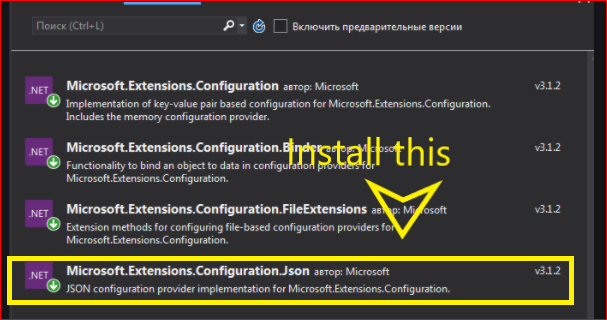
The error regarding the SetBasePath method typically arises due to a missing NuGet package. In .NET Core 3, you need to ensure that the Microsoft.Extensions.Configuration.Json package is included in your project.
To resolve this issue, you can follow these steps:
- Open your project in Visual Studio.
- Go to the NuGet Package Manager and search for Microsoft.Extensions.Configuration.Json.
- Install the package by clicking on the Install button.
You can also use the Package Manager Console to install the package with the following command:
Install-Package Microsoft.Extensions.Configuration.Json -Version 5.0.0Once you have successfully installed the package, you can verify that the SetBasePath method is now accessible and functioning as expected. The following image illustrates the installation process:
Using ConfigurationBuilder with JSON Files
After addressing the package installation, you can now use the ConfigurationBuilder to read JSON configuration files. The typical approach is to create a configuration instance that reads from the appSettings.json file located at the root of your project.
Here’s a complete example of how to set up the configuration builder:
using Microsoft.Extensions.Configuration;
using System.IO;

var configuration = new ConfigurationBuilder()
    .SetBasePath(Directory.GetCurrentDirectory())
    .AddJsonFile("appSettings.json", optional: true, reloadOnChange: true)
    .Build();

var connectionString = configuration.GetConnectionString("DefaultConnection");
Console.WriteLine(connectionString);
This code snippet initializes the configuration builder, sets the base path to the current directory, and adds the appSettings.json file. It then retrieves a connection string named DefaultConnection from the configuration.
Edge Cases & Gotchas
While using the ConfigurationBuilder, there are several edge cases and gotchas to be aware of:
- File Not Found: If the JSON file specified does not exist and the optional parameter is set to false, an exception will be thrown. Always ensure the file is present or set it to optional.
- Reloading Changes: If you want the application to reload the configuration when the JSON file changes, set the reloadOnChange parameter to true. This is useful in development scenarios.
- Environment Specific JSON: Consider using environment-specific JSON files (e.g., appSettings.Development.json) for different configurations based on the environment.
Performance & Best Practices
To ensure optimal performance and maintainability when using the ConfigurationBuilder, consider the following best practices:
- Minimize Configuration Sources: Only add the necessary configuration sources to avoid overhead. Too many sources can slow down the configuration loading process.
- Use Strongly Typed Configuration: Instead of accessing configuration values directly, consider binding them to strongly typed classes. This improves type safety and makes it easier to manage configuration values.
- Environment Variables: Leverage environment variables for sensitive information like connection strings or API keys, instead of hardcoding them in JSON files.
Conclusion
In this article, we've explored how to resolve the issue with the ConfigurationBuilder in .NET Core 3, specifically the error regarding the SetBasePath method. We discussed the importance of configuration in .NET Core applications, the necessary package installations, and how to effectively use the ConfigurationBuilder to read JSON files.
Key Takeaways:
- Ensure you have the Microsoft.Extensions.Configuration.Json package installed in your project.
- Use the ConfigurationBuilder to read configuration settings from JSON files.
- Be aware of edge cases such as file presence and configuration reloading.
- Follow best practices for performance and maintainability in your configuration management.
20210303095421.png)

