Hangfire in ASP.NET Core 3.1 – Background Jobs
Installing the Hangfire Packages
Install-Package Hangfire
Adds Hangfire service to our application. Open the Startup.cs class and locate a ConfigureServices method to register Hangfire as a service.
        public void ConfigureServices(IServiceCollection services)
        {
            services.AddControllers();
            services.AddHangfire(x => x.UseSqlServerStorage(Configuration.GetConnectionString("DefaultConnection")));
            //services.AddDbContext<DbEmployeeContext>(options => options.UseSqlServer(Configuration.GetConnectionString("DefaultConnection")));

            services.AddHangfireServer();
            services.AddControllers();
            services.AddSingleton<IJobTestService, JobTestService>();
        }
Adds Hangfire Dashboard to our application.
app.UseHangfireDashboard("/mydashboard");
After setting up our local database, we need to update the appsettings.json file: Here, we register Hangfire with SQL Server. We must provide a connection string to locate the SQL Server database named DbEmployee. DefaultConnection is a connection string name, added to the appsettings.json file.
{
  "ConnectionStrings": {
    "DefaultConnection": "Server=DESKTOP-K2Q2EAS; Database=DbEmployee; Trusted_Connection=True; MultipleActiveResultSets=true"
  },
  "Logging": {
    "LogLevel": {
      "Default": "Information",
      "Microsoft": "Warning",
      "Microsoft.Hosting.Lifetime": "Information"
    }
  },
  "AllowedHosts": "*"
}
Create DB context file
using Microsoft.EntityFrameworkCore;

namespace hangfirecode2night.Models
{
    public class DbEmployeeContext : DbContext
    {
        public DbEmployeeContext(DbContextOptions<DbEmployeeContext> options)
            : base(options)
        {
        }


    }
}
we specify the IJobTestService interface where we register four different methods
    public interface IJobTestService
    {
        void FireAndForgetJob(string userName);

        void ReccuringJob(string userName);

        void DelayedJob(string userName);

        void ContinuationJob(string userName);

    }
Our JobTestService class implements the IJobTestService interface we’ve created. Each method in the class only prints out some text to our console, instead of doing the actual work as it would in a real application.
  public class JobTestService : IJobTestService
    {
        public void FireAndForgetJob(string userName)
        {
            Console.WriteLine($"Hello from a Fire and Forget job!, {userName}");
        }

        public void ReccuringJob(string userName)
        {
            Console.WriteLine($"Hello from a Scheduled job!, {userName}");
        }

        public void DelayedJob(string userName)
        {
            Console.WriteLine($"Hello from a Delayed job!, {userName}");
        }

        public void ContinuationJob(string userName)
        {
            Console.WriteLine($"Hello from a Continuation job!, {userName}");
        }

    }
We create the ProductController constructor and inject the IBackgroundJobClient interface that Hangfire provides. We will be using this interface’s methods for scheduling different types of jobs. Besides that, we also inject the IJobTestService interface that we created.
    [Route("api/[controller]")]
    [ApiController]
    public class ProductController : ControllerBase
    {
        private readonly DbEmployeeContext _context;
        private readonly IDistributedCache _cache;
        private readonly IJobTestService _jobTestService;
        private readonly IBackgroundJobClient _backgroundJobClient;
        private readonly IRecurringJobManager _recurringJobManager;
        public ProductController(IJobTestService jobTestService, IBackgroundJobClient backgroundJobClient,
            IRecurringJobManager recurringJobManager)
        {
            _jobTestService = jobTestService;
            _backgroundJobClient = backgroundJobClient;
            _recurringJobManager = recurringJobManager;
        }
    }
Fire-and-forget Jobs
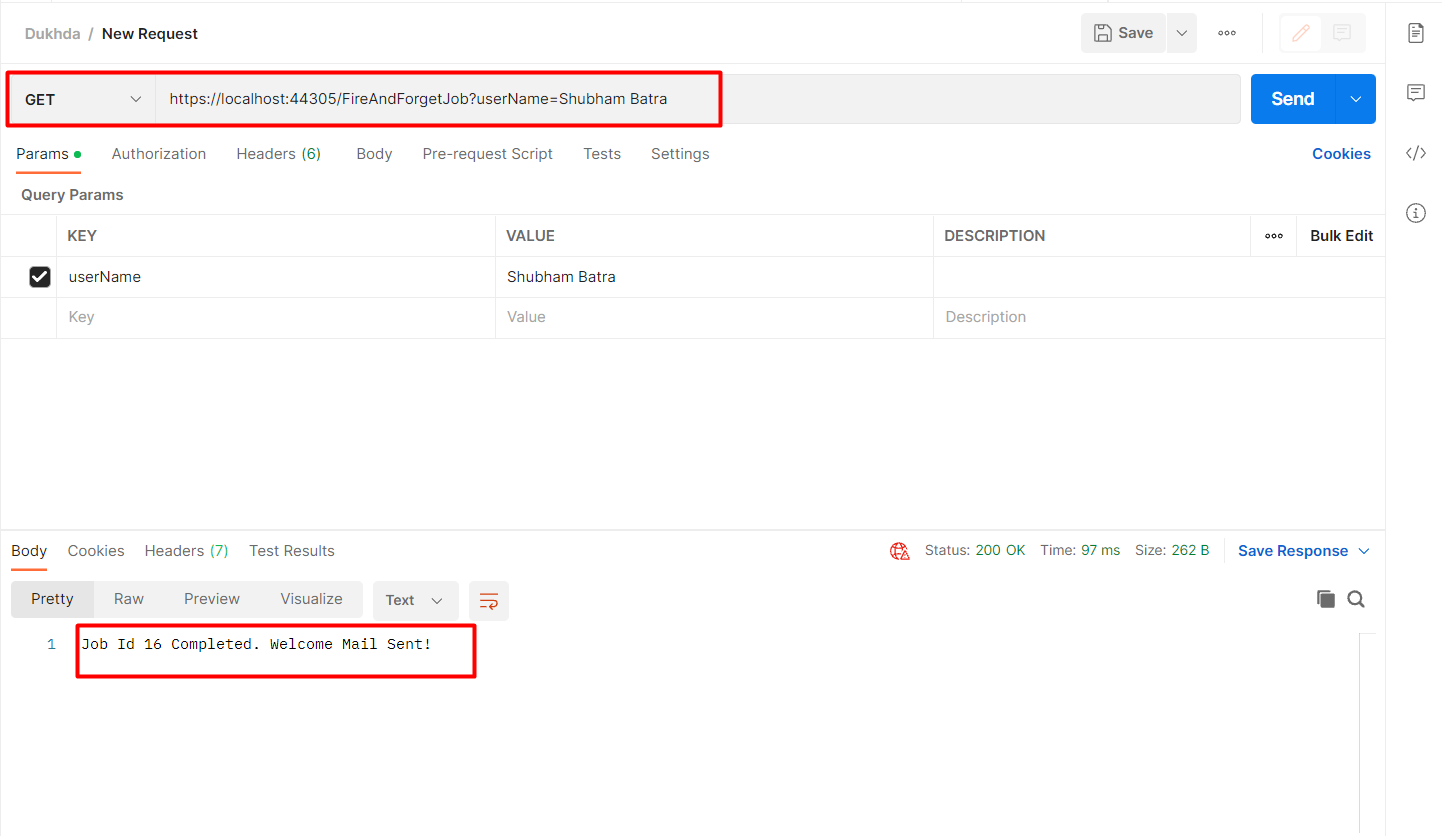
Fire-and-forget jobs are executed only once and almost immediately after creation. We will create our first background Job. Open up the Hangfire Controller that we had created. We will create a POST endpoint that welcomes a user with an email (ideally). Add in these codes.
        //FireAndForgetJob
        [HttpGet("/FireAndForgetJob")]
        public ActionResult CreateFireAndForgetJob(string userName)
        {
            var jobId = _backgroundJobClient.Enqueue(() => _jobTestService.FireAndForgetJob(userName));
            return Ok($"Job Id {jobId} Completed. Welcome Mail Sent!");
        }
Delayed Jobs
Delayed tasks are those we surely want to execute, but just not right now. We can schedule them at a certain time, maybe a minute from now or three months from now.
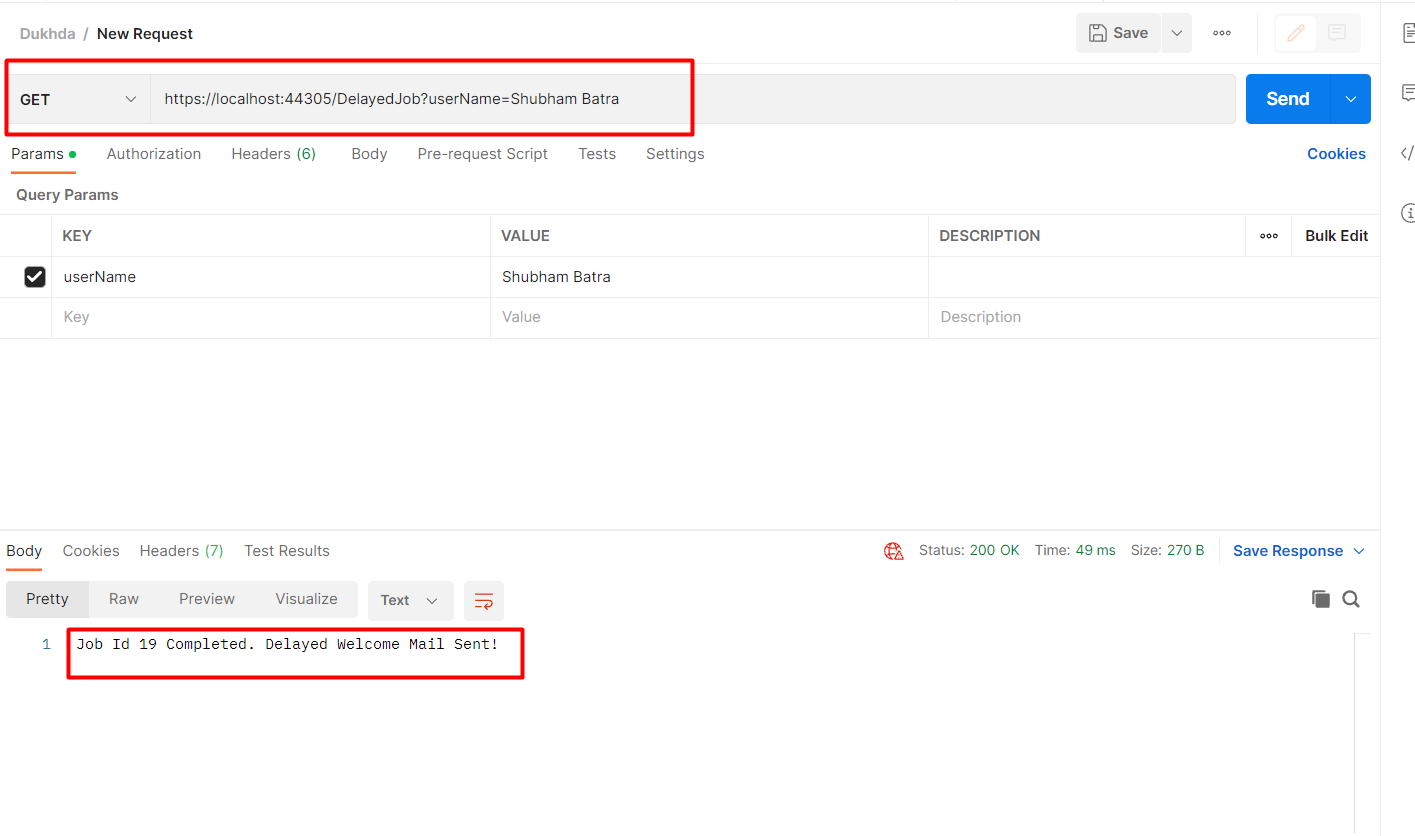
Now, what if we want to send a mail to a user, not immediately, but after 10 mins In such cases, we use delayed Jobs. Let’s see its implementation after which I will explain it in detail. In the same controller, add these lines of code. It is quite similar to the previous variant, but we introduce a delay factor to it.
        //DelayedJob
        [HttpGet("/DelayedJob")]
        public ActionResult CreateDelayedJob(string userName)
        {
            var jobId = _backgroundJobClient.Schedule(() => _jobTestService.DelayedJob(userName), TimeSpan.FromSeconds(60));
            return Ok($"Job Id {jobId} Completed. Delayed Welcome Mail Sent!");

        }
Recurring Jobs
We schedule our recurring jobs so they can repeat in a certain interval. For those types of tasks, Hangfire makes use of the CRON software utility.
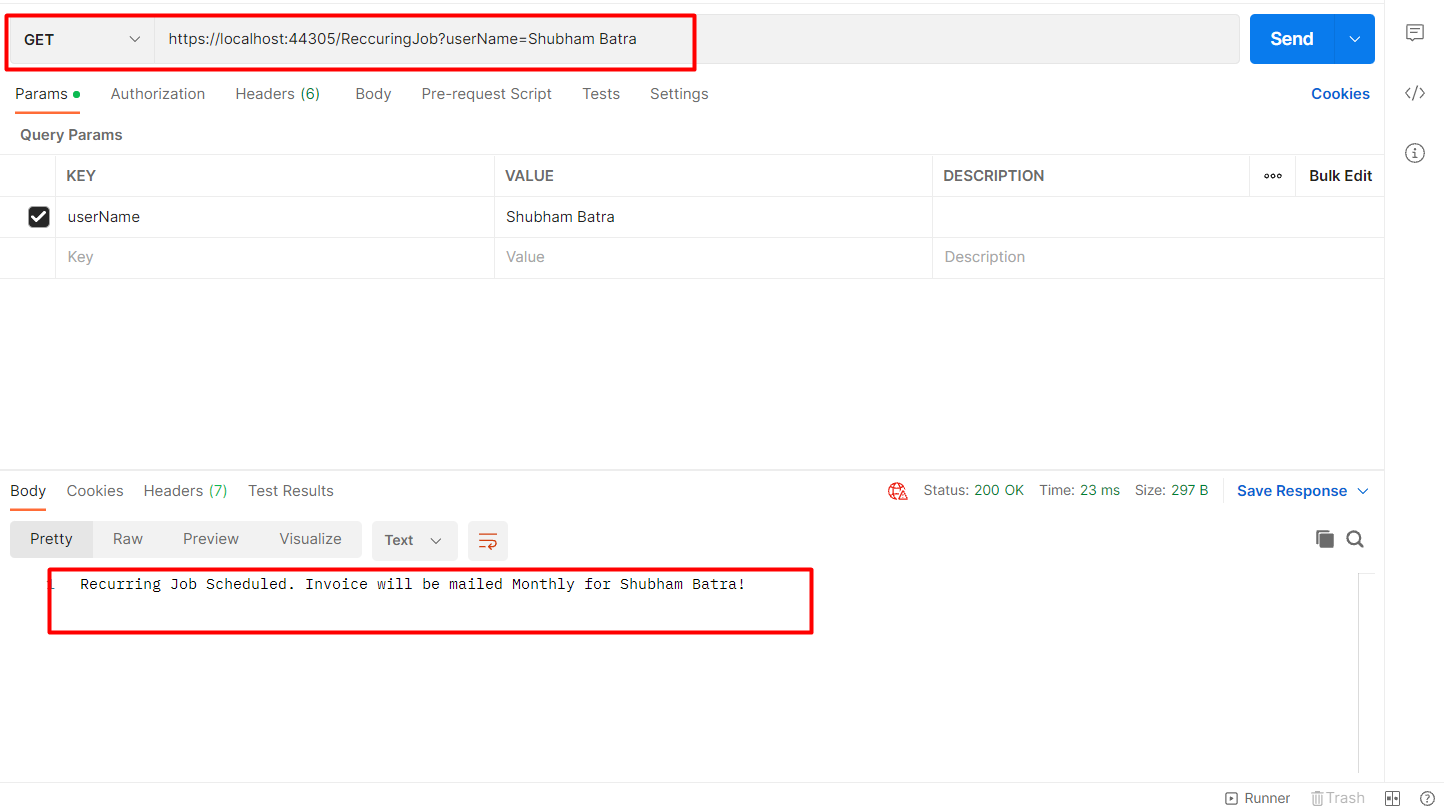
Our Customer has a subscription to our service. We would obviously have to send him/her a reminder about payment or the invoice itself. This calls the need for a Recurring Job, where I can send my customer emails on a monthly basis. This is supported in Hangfire using the CRON schedule.
What is CRON? CRON is a time-based utility that can define time intervals. Let’s see how to achieve such a requirement.
        //ReccuringJob
        [HttpGet("/ReccuringJob")]
        public ActionResult CreateReccuringJob(string userName)
        {
            _recurringJobManager.AddOrUpdate("jobId", () => _jobTestService.ReccuringJob(userName), Cron.Minutely);
            return Ok($"Recurring Job Scheduled. Invoice will be mailed Monthly for {userName}!");
        }
Continuation Jobs
The last type of job we are going to cover is the Continuation job. Its main feature is that it chains together task execution. With it, we can get two jobs to run one after the other in continuation.
This is a more complicated scenario. Let me try to keep it very simple. A user decides to unsubscribe from your service. After he confirms his action (Maybe by clicking the unsubscribe button), we (the application) have to unsubscribe him from the system and send him a confirmation mail after that as well. So, the First job is to actually unsubscribe the user. The second job is to send a mail confirming the action. The second job should be executed only after the first job is completed properly. Get the scenario?
        //ContinuationJob
        [HttpGet("/ContinuationJob")]
        public ActionResult CreateContinuationJob(string userName)
        {
            var jobId = _backgroundJobClient.Enqueue(() => _jobTestService.FireAndForgetJob(userName));
            _backgroundJobClient.ContinueJobWith(jobId, () => _jobTestService.ContinuationJob(userName));

            return Ok($"Unsubscribed");
        }
you can copy all the controller's code
using Hangfire;
using hangfirecode2night.Models;
using hangfirecode2night.Services;
using Microsoft.AspNetCore.Mvc;
using Microsoft.EntityFrameworkCore;
using Microsoft.Extensions.Caching.Distributed;
using Newtonsoft.Json;
using System;
using System.Collections.Generic;
using System.Text;
using System.Threading.Tasks;

namespace hangfirecode2night.Controllers
{
    [Route("api/[controller]")]
    [ApiController]
    public class ProductController : ControllerBase
    {
        private readonly DbEmployeeContext _context;
        private readonly IDistributedCache _cache;
        private readonly IJobTestService _jobTestService;
        private readonly IBackgroundJobClient _backgroundJobClient;
        private readonly IRecurringJobManager _recurringJobManager;
        public ProductController(IJobTestService jobTestService, IBackgroundJobClient backgroundJobClient,
            IRecurringJobManager recurringJobManager)
        {
            _jobTestService = jobTestService;
            _backgroundJobClient = backgroundJobClient;
            _recurringJobManager = recurringJobManager;
        }

        //FireAndForgetJob
        [HttpGet("/FireAndForgetJob")]
        public ActionResult CreateFireAndForgetJob(string userName)
        {
            var jobId = _backgroundJobClient.Enqueue(() => _jobTestService.FireAndForgetJob(userName));
            return Ok($"Job Id {jobId} Completed. Welcome Mail Sent!");
        }

        //DelayedJob
        [HttpGet("/DelayedJob")]
        public ActionResult CreateDelayedJob(string userName)
        {
            var jobId = _backgroundJobClient.Schedule(() => _jobTestService.DelayedJob(userName), TimeSpan.FromSeconds(60));
            return Ok($"Job Id {jobId} Completed. Delayed Welcome Mail Sent!");

        }

        //ReccuringJob
        [HttpGet("/ReccuringJob")]
        public ActionResult CreateReccuringJob(string userName)
        {
            _recurringJobManager.AddOrUpdate("jobId", () => _jobTestService.ReccuringJob(userName), Cron.Minutely);
            return Ok($"Recurring Job Scheduled. Invoice will be mailed Monthly for {userName}!");
        }

        //ContinuationJob
        [HttpGet("/ContinuationJob")]
        public ActionResult CreateContinuationJob(string userName)
        {
            var jobId = _backgroundJobClient.Enqueue(() => _jobTestService.FireAndForgetJob(userName));
            _backgroundJobClient.ContinueJobWith(jobId, () => _jobTestService.ContinuationJob(userName));

            return Ok($"Unsubscribed");
        }
    }
}
Let’s fire up the application and go to Postman.
https://localhost:44305/FireAndForgetJob?userName=Shubham Batra
 Let’s fire up the application and go to Postman.
https://localhost:44305/DelayedJob?userName=Shubham Batra
 Let’s fire up the application and go to Postman.
https://localhost:44305/ReccuringJob?userName=Shubham Batra
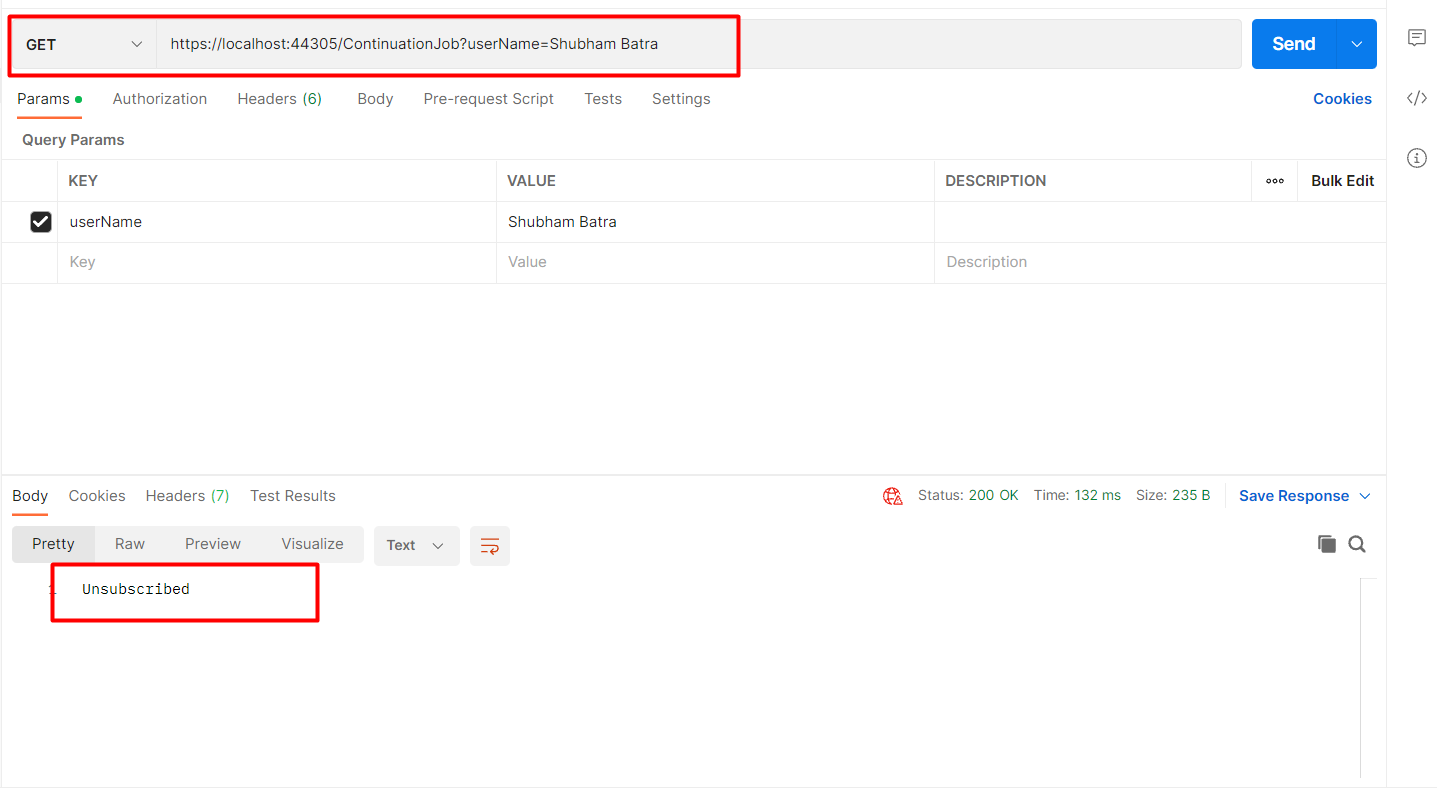
 Let’s fire up the application and go to Postman.
https://localhost:44305/ContinuationJob?userName=Shubham Batra
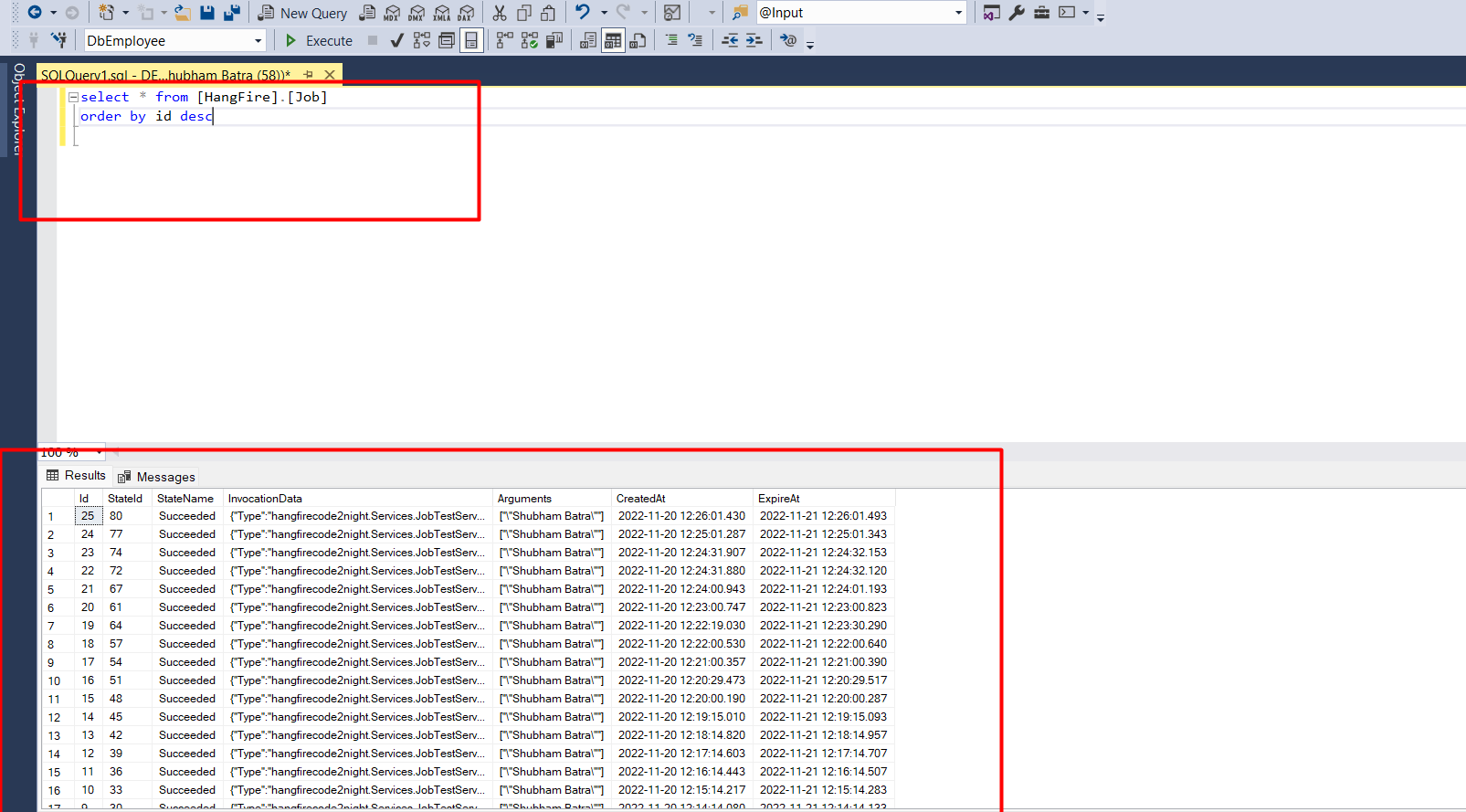
 Check your database for all hangfire transaction