
How to Encrypt and Decrypt Password in Asp.Net
Hello guys and welcome to Code2Night, we all need to secure our applications against unwanted user attacks, for saving privacy and maintaining application security. So for that purpose, we have to keep our passwords Encrypted in the Database. So, we will see how to Encrypt and Decrypt Passwords in Asp.Net.
Password Encryption
There are two ways of encrypting passwords in Asp.Net. Encrypting a password is simply the form of data that the user cannot understand. So we can achieve that by converting our password to a base 64 string. And then we can decrypt the base 64 string to a normal string when needed.
For converting the password to Base 64 Encrypted Password you can do the following
 public static string EncryptPasswordBase64(string text)
 {
     var plainTextBytes = System.Text.Encoding.UTF8.GetBytes(text);
     return System.Convert.ToBase64String(plainTextBytes);
 }
This will encrypt your string to base 64 data.
Decrypting Base 64
For decoding or decrypting the base 64 data to a normal string, we can do this
 public static string DecryptPasswordBase64(string base64EncodedData)
 {
     var base64EncodedBytes = System.Convert.FromBase64String(base64EncodedData);
     return System.Text.Encoding.UTF8.GetString(base64EncodedBytes);
 }
RFC Encryption
Base 64 encryption is comparatively less secure encryption as that can be decoded easily. So we have to use a more secure way of encryption passwords which is RFC algorithm cryptography. You can use RFC Encryption like this.
 public static string EncryptPassword(string clearText)
        {
            string EncryptionKey = "MAKVKKKBNI99212";
            byte[] clearBytes = Encoding.Unicode.GetBytes(clearText);
            using (Aes encryptor = Aes.Create())
            {
                Rfc2898DeriveBytes pdb = new Rfc2898DeriveBytes(EncryptionKey, new byte[] { 0x49, 0x76, 0x61, 0x6e, 0x20, 0x4d, 0x65, 0x64, 0x76, 0x65, 0x64, 0x65, 0x76 });
                encryptor.Key = pdb.GetBytes(32);
                encryptor.IV = pdb.GetBytes(16);
                using (MemoryStream ms = new MemoryStream())
                {
                    using (CryptoStream cs = new CryptoStream(ms, encryptor.CreateEncryptor(), CryptoStreamMode.Write))
                    {
                        cs.Write(clearBytes, 0, clearBytes.Length);
                        cs.Close();
                    }
                    clearText = Convert.ToBase64String(ms.ToArray());
                }
            }
            return clearText;
        }
Decrypting RFC Encrypted Password
For decrypting the RFC Encrypted password. You can do this. We have to use the same encryption key. That we used while encrypting.
public static string DecryptPassword(string cipherText)
        {
            string EncryptionKey = "MAKVKKKBNI99212";
            byte[] cipherBytes = Convert.FromBase64String(cipherText);
            using (Aes encryptor = Aes.Create())
            {
                Rfc2898DeriveBytes pdb = new Rfc2898DeriveBytes(EncryptionKey, new byte[] { 0x49, 0x76, 0x61, 0x6e, 0x20, 0x4d, 0x65, 0x64, 0x76, 0x65, 0x64, 0x65, 0x76 });
                encryptor.Key = pdb.GetBytes(32);
                encryptor.IV = pdb.GetBytes(16);
                using (MemoryStream ms = new MemoryStream())
                {
                    using (CryptoStream cs = new CryptoStream(ms, encryptor.CreateDecryptor(), CryptoStreamMode.Write))
                    {
                        cs.Write(cipherBytes, 0, cipherBytes.Length);
                        cs.Close();
                    }
                    cipherText = Encoding.Unicode.GetString(ms.ToArray());
                }
            }
            return cipherText;
        }
So, this is how we can encrypt any password using Base 64 and with RFC encryption. You can check the following output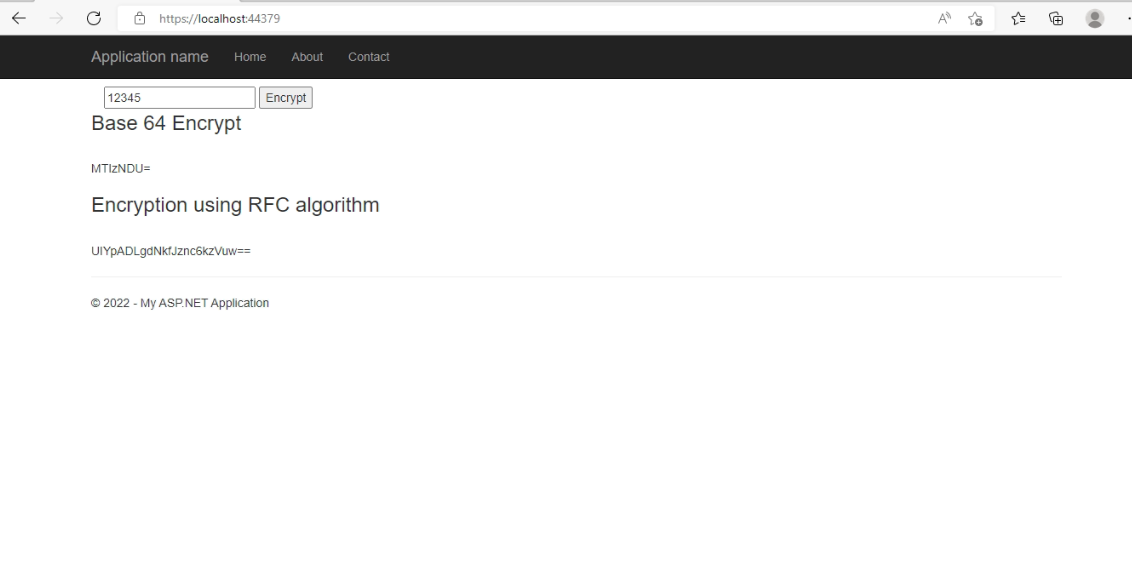
public static class Encrypt
    {
        public static string EncryptPassword(string clearText)
        {
            string EncryptionKey = "MAKVKKKBNI99212";
            byte[] clearBytes = Encoding.Unicode.GetBytes(clearText);
            using (Aes encryptor = Aes.Create())
            {
                Rfc2898DeriveBytes pdb = new Rfc2898DeriveBytes(EncryptionKey, new byte[] { 0x49, 0x76, 0x61, 0x6e, 0x20, 0x4d, 0x65, 0x64, 0x76, 0x65, 0x64, 0x65, 0x76 });
                encryptor.Key = pdb.GetBytes(32);
                encryptor.IV = pdb.GetBytes(16);
                using (MemoryStream ms = new MemoryStream())
                {
                    using (CryptoStream cs = new CryptoStream(ms, encryptor.CreateEncryptor(), CryptoStreamMode.Write))
                    {
                        cs.Write(clearBytes, 0, clearBytes.Length);
                        cs.Close();
                    }
                    clearText = Convert.ToBase64String(ms.ToArray());
                }
            }
            return clearText;
        }

        public static string DecryptPassword(string cipherText)
        {
            string EncryptionKey = "MAKVKKKBNI99212";
            byte[] cipherBytes = Convert.FromBase64String(cipherText);
            using (Aes encryptor = Aes.Create())
            {
                Rfc2898DeriveBytes pdb = new Rfc2898DeriveBytes(EncryptionKey, new byte[] { 0x49, 0x76, 0x61, 0x6e, 0x20, 0x4d, 0x65, 0x64, 0x76, 0x65, 0x64, 0x65, 0x76 });
                encryptor.Key = pdb.GetBytes(32);
                encryptor.IV = pdb.GetBytes(16);
                using (MemoryStream ms = new MemoryStream())
                {
                    using (CryptoStream cs = new CryptoStream(ms, encryptor.CreateDecryptor(), CryptoStreamMode.Write))
                    {
                        cs.Write(cipherBytes, 0, cipherBytes.Length);
                        cs.Close();
                    }
                    cipherText = Encoding.Unicode.GetString(ms.ToArray());
                }
            }
            return cipherText;
        }
        public static string EncryptPasswordBase64(string text)
        {
            var plainTextBytes = System.Text.Encoding.UTF8.GetBytes(text);
            return System.Convert.ToBase64String(plainTextBytes);
        }
        public static string DecryptPasswordBase64(string base64EncodedData)
        {
            var base64EncodedBytes = System.Convert.FromBase64String(base64EncodedData);
            return System.Text.Encoding.UTF8.GetString(base64EncodedBytes);
        }
    }
On the controller, we will use the class like this
 [HttpPost]
        public ActionResult Index(string Password)
        {
            ViewBag.Encrypt = Encrypt.EncryptPasswordBase64(Password);
            ViewBag.RfcEncrypt=Encrypt.EncryptPassword(Password);
            ViewBag.Password=Password;
            //For Decrypt
            //  ViewBag.Base64Decrypt = Encrypt.DecryptPasswordBase64(Password);
            // ViewBag.RfcDecrypt=Encrypt.DecryptPassword(Password);

            return View();
        }
For the sample code, you can download the attached code and use that. Let us know if you face any issues. This is how we can encrypt and decrypt passwords in Asp.Net MVC
