
How to Return Query Results as a Comma Separated in MySQL
Understanding GROUP_CONCAT()
The GROUP_CONCAT() function is designed to concatenate values from multiple rows into a single string, with the values separated by a specified delimiter. By default, this delimiter is a comma, but you can customize it to fit your needs. This function is particularly useful in scenarios where you want to aggregate information from a one-to-many relationship, such as combining all the districts within a particular country.
For example, consider a database containing information about cities and their respective districts. Using GROUP_CONCAT(), you can easily retrieve a list of districts for a given country. This can help in generating reports or summaries without having to manipulate the data outside of SQL.
SELECT CountryCode, GROUP_CONCAT(District) AS 'Districts'
FROM city
WHERE CountryCode = 'IND'
GROUP BY CountryCode;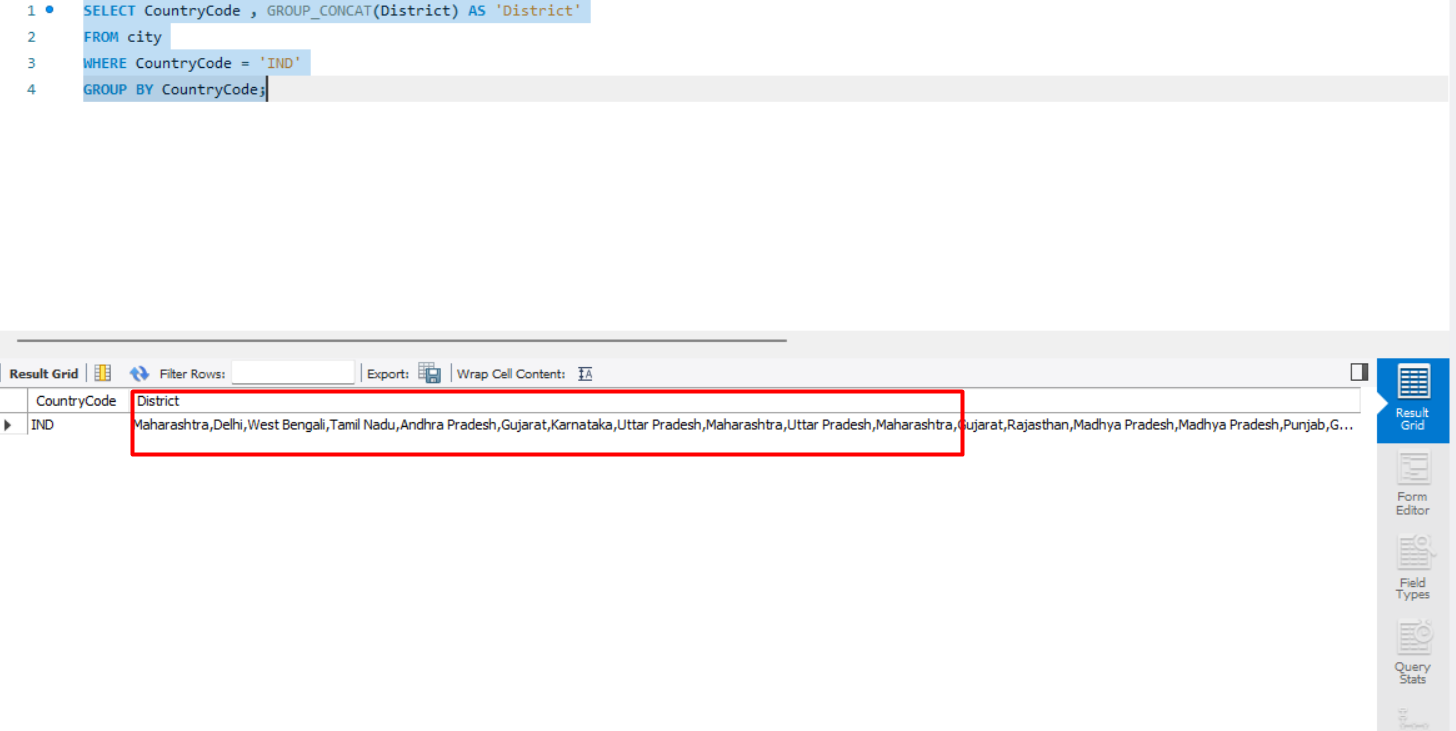
Prerequisites
Before diving into the use of GROUP_CONCAT(), it's essential to have a basic understanding of SQL and how to work with MySQL databases. Familiarity with concepts such as SELECT, WHERE, and GROUP BY clauses will greatly enhance your ability to utilize this function effectively. Additionally, having a sample database or access to one will allow you to practice the examples provided in this post.
Basic Syntax of GROUP_CONCAT()
The syntax of the GROUP_CONCAT() function is straightforward. It typically follows this structure:
GROUP_CONCAT(column_name [ORDER BY column_name] [SEPARATOR 'separator'])Here’s a breakdown of its components:
- column_name: The column whose values you want to concatenate.
- ORDER BY (optional): Specifies the order in which the values should be concatenated.
- SEPARATOR (optional): Defines a custom separator instead of the default comma.
Using GROUP_CONCAT() with ORDER BY
One of the powerful features of GROUP_CONCAT() is the ability to control the order of concatenated values. By using the ORDER BY clause within the function, you can ensure that the results are presented in a specific sequence. This can be particularly useful when the order of the values matters, such as sorting names alphabetically.
SELECT CountryCode, GROUP_CONCAT(District ORDER BY District ASC) AS 'Districts'
FROM city
WHERE CountryCode = 'IND'
GROUP BY CountryCode;
In this example, the districts will be concatenated in alphabetical order. This approach can enhance the readability of the output, especially when dealing with long lists.
Customizing the Separator
While the default separator for GROUP_CONCAT() is a comma, you may want to use a different character to suit your application's needs. For instance, if you are generating a CSV file, you might want to use a semicolon or a different delimiter.
SELECT CountryCode, GROUP_CONCAT(District SEPARATOR '; ') AS 'Districts'
FROM city
WHERE CountryCode = 'IND'
GROUP BY CountryCode;
In this case, the districts will be separated by a semicolon and a space, making it easier to read in certain contexts.
Handling NULL Values
When using GROUP_CONCAT(), it’s important to consider how NULL values are treated. By default, GROUP_CONCAT() ignores NULL values while concatenating. This means that if any rows contain a NULL in the specified column, those rows will not contribute to the final concatenated string.
If you want to include a placeholder for NULL values in your results, you can use the IFNULL() function to replace NULLs with a specific string.
SELECT CountryCode, GROUP_CONCAT(IFNULL(District, 'No District') SEPARATOR ', ') AS 'Districts'
FROM city
WHERE CountryCode = 'IND'
GROUP BY CountryCode;
In this example, if a district is NULL, it will be replaced with the string 'No District', ensuring that your output is informative and complete.
Edge Cases & Gotchas
While GROUP_CONCAT() is a robust function, there are a few edge cases and gotchas to be aware of:
- Maximum Length: The result of GROUP_CONCAT() is limited to a maximum length defined by the group_concat_max_len system variable. By default, this is set to 1024 bytes. If your concatenated string exceeds this limit, it will be truncated. You can increase this limit by running:
SET SESSION group_concat_max_len = 10000;Performance & Best Practices
When using GROUP_CONCAT(), it’s crucial to keep performance in mind, especially when working with large datasets. Here are some best practices to optimize your queries:
- Indexing: Ensure that the columns used in your WHERE and GROUP BY clauses are indexed. This can significantly speed up query execution.
- Avoid Unnecessary Columns: Only select the columns that are necessary for your result set. This reduces the amount of data processed and can improve performance.
- Limit Results: If possible, limit the number of rows processed by using LIMIT or filtering with WHERE clauses. This is especially important when dealing with large tables.
Conclusion
In summary, the GROUP_CONCAT() function in MySQL is a powerful tool for aggregating data across multiple rows into a single, readable string. By understanding its syntax and capabilities, you can leverage it to create more informative and user-friendly reports. Remember to consider best practices for performance and be aware of edge cases that may affect your results.
- Use GROUP_CONCAT() to concatenate multiple rows into a single string.
- Customize the separator to fit your reporting needs.
- Handle NULL values appropriately to maintain informative output.
- Be mindful of performance implications with large datasets.
