
Tag or mention people like WhatsApp & Skype by using @ in Angular
Understanding the Requirement
In today’s digital communication landscape, the ability to mention users within chat applications has become increasingly relevant. This functionality not only enhances user experience but also helps in organizing conversations and directing messages to specific individuals. Implementing a tagging feature where users can type '@' followed by a name to mention someone is commonly seen in popular messaging platforms like Skype, Slack, and WhatsApp. Understanding the technical requirements and complexities involved in creating such a feature in Angular is crucial for developers.
Angular, being a powerful framework for building dynamic web applications, provides various tools and packages to facilitate this functionality. One such package is Angular-Mentions, which simplifies the process of implementing user tagging in chat interfaces. This package allows developers to create a user-friendly mention system with minimal effort.
Prerequisites
Before diving into the implementation, it is essential to ensure that you have the following prerequisites:
- Node.js: Ensure that Node.js is installed on your machine to manage packages using npm.
- Angular CLI: Familiarity with Angular CLI will help in setting up and managing your Angular projects.
- Basic Understanding of Angular: A foundational knowledge of Angular components, modules, and templates will be beneficial.
Installing Angular-Mentions
To get started with the tagging feature, you need to install the Angular-Mentions package. This can be done easily using npm. Open your terminal and run the following command:
npm install angular-mentionsAfter the installation completes, you will need to rebuild your project to ensure that the new package is included. This can be done by running:
ng serveSetting Up Angular-Mentions in Your Component
Once you have installed the package, you need to import it into your Angular component. This is done by adding the MentionModule to your module imports. Here’s how you can do that:
import { MentionModule } from 'angular-mentions';

@NgModule({
  imports: [
    MentionModule,
    // other imports
  ],
  // other properties
})
Next, you can use the mention directive in your input element. This directive will enable the mention functionality in your chat input. Here’s an example of how to set it up:
@Component({
  selector: 'app-chat',
  template: `

  `
})
export class ChatComponent {
  items: string[] = ["Noah", "Liam", "Mason", "Jacob"];
}
Using the Mention Functionality
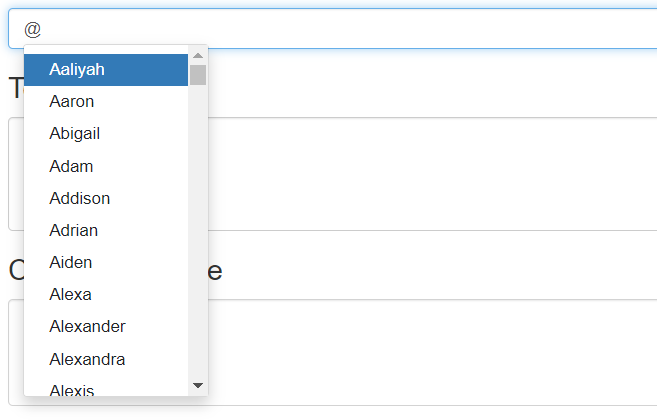
With the mention directive in place, users can now type '@' in the input field to see a list of users to mention. The items array contains the names of users, which will be displayed as suggestions. When a user selects a name from the dropdown, it will be inserted into the input field, allowing for seamless tagging.
To enhance the user experience, you may want to implement additional features such as filtering the list of users based on the characters typed after '@'. This will make it easier for users to find the person they want to mention, especially in larger groups.
filterItems(query: string): string[] {
  return this.items.filter(item => item.toLowerCase().includes(query.toLowerCase()));
}
Edge Cases & Gotchas
While implementing the mention functionality, there are several edge cases and potential gotchas to be aware of:
- Empty Input Handling: Ensure that the input field gracefully handles cases where no user is selected after typing '@'. You may want to clear the input or provide a default message.
- Performance Considerations: If your list of users is large, consider implementing lazy loading or pagination to improve performance and user experience.
- Keyboard Navigation: Users should be able to navigate through the suggestions using their keyboard. Implementing arrow key support can significantly enhance usability.
- Styling the Dropdown: Make sure the dropdown that appears for mentions is styled appropriately to match the rest of your application.
Performance & Best Practices
To optimize the mention functionality in your Angular application, consider the following best practices:
- Debouncing Input: Implement debouncing on the input to reduce the number of times the filtering function is called. This will enhance performance, especially for large datasets.
- Throttling API Calls: If the list of users is fetched from an API, ensure that calls are throttled to prevent overwhelming the server with requests.
- Accessibility: Ensure that your mention system is accessible. Provide ARIA attributes and ensure that it can be navigated using the keyboard.
- Testing: Write unit tests for your mention functionality to ensure that it behaves as expected in various scenarios.
Conclusion
Implementing a user mention feature in Angular can significantly enhance your chat application's functionality. By using the Angular-Mentions package, you can create a seamless experience for users to mention others in conversations.
Key Takeaways:
- Understand the requirements and complexities of implementing user mentions.
- Install and set up the Angular-Mentions package in your Angular project.
- Handle edge cases and performance considerations to provide a smooth user experience.
- Follow best practices to ensure your mention functionality is efficient and accessible.
