
How to read json in Sql Server
JSON in SQL Server
SQL Server allows you to store JSON data as a string in an Nvarchar variable. To read or deserialize this JSON data, you can use the OPENJSON function, which is designed to parse JSON strings and return the data in a tabular format. This capability is particularly useful for applications that need to integrate with JSON APIs or store semi-structured data.
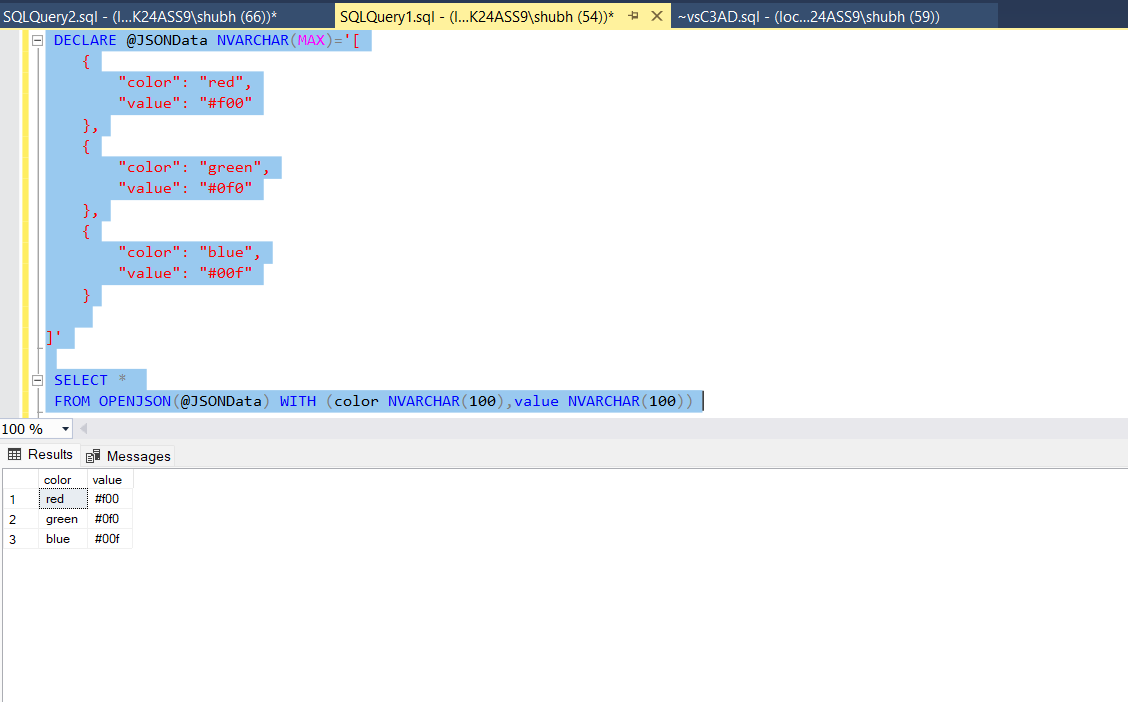
Here’s a simple example of how to read JSON data using the OPENJSON function:
DECLARE @JSONData NVARCHAR(MAX) = '[ { "color": "red", "value": "#f00" }, { "color": "green", "value": "#0f0" }, { "color": "blue", "value": "#00f" } ]';
SELECT * FROM OPENJSON(@JSONData) WITH (color NVARCHAR(100), value NVARCHAR(100));
In this example, we store a JSON array in a variable and then use OPENJSON to parse it. The WITH clause specifies the properties we want to extract from the JSON array. The output will be presented in a table format, making it easy to read and manipulate.
Nesting JSON with OPENJSON
JSON data can often be nested, which means you might need to dig deeper to access the properties you want. The OPENJSON function can also handle nested JSON structures. When working with nested JSON, you can use the second parameter of OPENJSON to specify the path to the data you wish to extract.
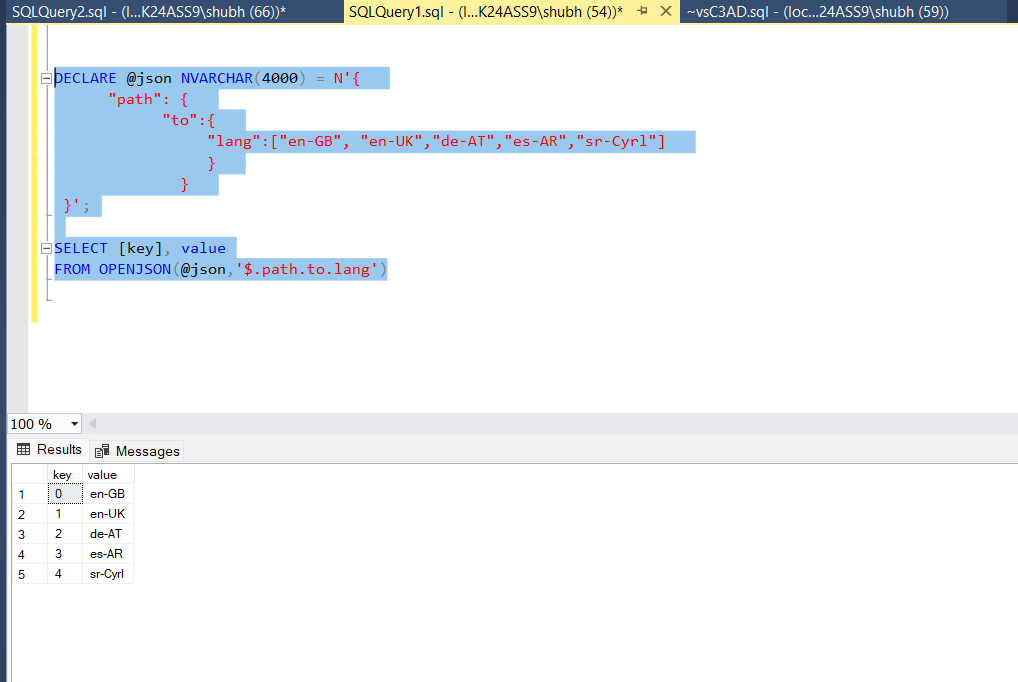
Consider the following example that demonstrates how to read nested JSON:
DECLARE @json NVARCHAR(4000) = N'{ "path": { "to":{ "lang":["en-GB", "en-UK","de-AT","es-AR","sr-Cyrl"] } } } }';
SELECT [key], value FROM OPENJSON(@json, '$.path.to.lang');
In this case, we pass the path '$.path.to.lang' to the OPENJSON function, allowing us to extract the array of languages from the nested JSON structure. The output will display each language as a separate row.
Working with JSON Arrays
When dealing with JSON arrays, you can still utilize the OPENJSON function to parse them effectively. Each element in the array can be treated like a row in a table. This is especially useful when you need to perform operations like filtering or aggregating data based on the properties of the JSON objects.
Here’s an example that demonstrates how to work with a JSON array:
DECLARE @jsonArray NVARCHAR(MAX) = '[{"id":1, "name":"Item1"}, {"id":2, "name":"Item2"}]';
SELECT id, name FROM OPENJSON(@jsonArray) WITH (id INT, name NVARCHAR(100));
This example shows how to read a JSON array of objects, extracting the id and name properties from each object in the array.
Handling Complex JSON Structures
Complex JSON structures may contain multiple levels of nesting or a combination of arrays and objects. To handle these cases effectively, you can combine the use of OPENJSON with other SQL functions like JOIN and OUTER APPLY to flatten the data for easier analysis.
For instance, consider a JSON structure that contains multiple nested arrays:
DECLARE @complexJson NVARCHAR(MAX) = N'{"store": {"books": [{"title": "Book1", "author": "Author1"}, {"title": "Book2", "author": "Author2"}]}}';
SELECT b.title, b.author
FROM OPENJSON(@complexJson, '$.store.books') WITH (title NVARCHAR(100), author NVARCHAR(100)) AS b;
This query extracts the titles and authors of books from a more complex JSON structure, demonstrating how to navigate through multiple levels of nesting.
Edge Cases & Gotchas
When working with JSON in SQL Server, there are several edge cases and potential pitfalls to be aware of:
- Invalid JSON Format: Ensure that the JSON data you are trying to read is well-formed. Invalid JSON will cause the OPENJSON function to fail, resulting in an error.
- Data Type Mismatches: Be cautious about data type mismatches when defining the schema in the WITH clause. If the JSON data type does not match the specified SQL data type, it may lead to conversion errors.
- Nested Structures: When dealing with deeply nested structures, you may need to use multiple OPENJSON calls or leverage OUTER APPLY to flatten the data properly.
Performance & Best Practices
To ensure optimal performance when working with JSON data in SQL Server, consider the following best practices:
- Indexing: If you're frequently querying JSON data, consider creating computed columns that extract specific properties from your JSON data and indexing those columns for faster retrieval.
- Limit Data Retrieval: Avoid retrieving more data than necessary. Use the WITH clause to specify only the properties you need from the JSON structure.
- Validate JSON: Implement validation checks to ensure the JSON data is well-formed before processing it with OPENJSON.
Conclusion
In this blog post, we explored how to read JSON data in SQL Server using the OPENJSON function. We covered various scenarios, including reading simple and nested JSON structures, handling JSON arrays, and working with complex JSON data. By following best practices, you can efficiently manage JSON data in your SQL Server applications.
- SQL Server supports reading JSON data using the OPENJSON function.
- You can read both simple and nested JSON structures.
- JSON arrays can be treated like tables for easy data manipulation.
- Be aware of edge cases such as invalid JSON formats and data type mismatches.
- Follow best practices for performance optimization when working with JSON data.
