Integrate Razorpay Payment Gateway in ASP.NET Core 8.0
Creating Razorpay Payment Gateway Account Setup
- Let’s signup Razorpay payment Gateway using this link, You can sign up using your Google account also.
- After sign up it ask the “business type” along with your name and mobile number.
- Then move Razorpay account dashboard and go to Settings then API Keys Tab and Generate a key for the selected mode (Test or Live)
Integrate Razorpay Payment Gateway in ASP.NET Core
Let’s create ASP.NET Core MVC 8.0 project using Visual studio 2022.
Add Razorpay package in Nuget
NuGet\Install-Package Razorpay -Version 3.1.0
Create Model/Entity Class
Let’s create the 2 entities that hold the PaymentRequest.cs and MerchantOrder.cs details.
public class MerchantOrder
    {
        public string OrderId { get; set; }
        public string RazorpayKey { get; set; }
        public int Amount { get; set; }
        public string Currency { get; set; }
        public string Name { get; set; }
        public string Email { get; set; }
        public string PhoneNumber { get; set; }
        public string Address { get; set; }
        public string Description { get; set; }
    }
PaymentRequest.cs
public class PaymentRequest
    {
        [Required]
        public string Name { get; set; }
        [Required]
        public string Email { get; set; }
        [Required]
        public string PhoneNumber { get; set; }
        [Required]
        public string Address { get; set; }
        [Required]
        public int Amount { get; set; }
    }
Create the Business Logic to Integrate Razorpay
Create the Service method that holds the business logic. Let’s create a folder name as “Service” inside the Razorpay project.
public interface IPaymentService
    {
         Task<MerchantOrder> ProcessMerchantOrder(PaymentRequest payRequest);
         Task<string> CompleteOrderProcess(IHttpContextAccessor _httpContextAccessor);
    }
Implement Interface inside “PaymentService”
namespace Razorpaycore8.Service
{
    public interface IPaymentService
    {
        Task<MerchantOrder> ProcessMerchantOrder(PaymentRequest payRequest);
        Task<string> CompleteOrderProcess(IHttpContextAccessor _httpContextAccessor);
    }

    public class PaymentService : IPaymentService
    {
        public Task<MerchantOrder> ProcessMerchantOrder(PaymentRequest payRequest)
        {
            try
            {
                // Generate random receipt number for order
                Random randomObj = new Random();
                string transactionId = randomObj.Next(10000000, 100000000).ToString();
                Razorpay.Api.RazorpayClient client = new Razorpay.Api.RazorpayClient("rzp_test_f10WA3OlIkQgII", "pCNbV6YvWNDPkSxi7Q2ODLjr");
                Dictionary<string, object> options = new Dictionary<string, object>();
                options.Add("amount", payRequest.Amount * 100);
                options.Add("receipt", transactionId);
                options.Add("currency", "INR");
                options.Add("payment_capture", "0"); // 1 - automatic  , 0 - manual
                //options.Add("Notes", "Test Payment of Merchant");
                Razorpay.Api.Order orderResponse = client.Order.Create(options);
                string orderId = orderResponse["id"].ToString();
                MerchantOrder order = new MerchantOrder
                {
                    OrderId = orderResponse.Attributes["id"],
                    RazorpayKey = "rzp_test_f10WA3OlIkQgII",
                    Amount = payRequest.Amount * 100,
                    Currency = "INR",
                    Name = payRequest.Name,
                    Email = payRequest.Email,
                    PhoneNumber = payRequest.PhoneNumber,
                    Address = payRequest.Address,
                    Description = "Order by Merchant"
                };
                return Task.FromResult(order);
            }
            catch (Exception ex)
            {
                throw;
            }
        }
        public async Task<string> CompleteOrderProcess(IHttpContextAccessor _httpContextAccessor)
        {
            try
            {
                string paymentId = _httpContextAccessor.HttpContext.Request.Form["rzp_paymentid"];
                // This is orderId
                string orderId = _httpContextAccessor.HttpContext.Request.Form["rzp_orderid"];
                Razorpay.Api.RazorpayClient client = new Razorpay.Api.RazorpayClient("rzp_test_f10WA3OlIkQgII", "pCNbV6YvWNDPkSxi7Q2ODLjr");
                Razorpay.Api.Payment payment = client.Payment.Fetch(paymentId);
                // This code is for capture the payment
                Dictionary<string, object> options = new Dictionary<string, object>();
                options.Add("amount", payment.Attributes["amount"]);
                Razorpay.Api.Payment paymentCaptured = payment.Capture(options);
                string amt = paymentCaptured.Attributes["amount"];
                return paymentCaptured.Attributes["status"];
            }
            catch (Exception)
            {
                throw;
            }
        }
    }


}
Add the Dependency services inside Program.cs
builder.Services.AddTransient<IPaymentService, PaymentService>();
builder.Services.AddSingleton<IHttpContextAccessor, HttpContextAccessor>();
Create a Controller as PaymentController
  public class PaymentController : Controller
  {
      private readonly ILogger<PaymentController> _logger;
      private readonly IPaymentService _service;
      private IHttpContextAccessor _httpContextAccessor;
      public PaymentController(ILogger<PaymentController> logger, IPaymentService service, IHttpContextAccessor httpContextAccessor)
      {
          _logger = logger;
          _service = service;
          _httpContextAccessor = httpContextAccessor;
      }
      public IActionResult Index()
      {
          return View();
      }
      [HttpPost]
      public async Task<IActionResult> ProcessRequestOrder(PaymentRequest _paymentRequest)
      {
          MerchantOrder _marchantOrder = await _service.ProcessMerchantOrder(_paymentRequest);
          return View("Payment", _marchantOrder);
      }
      [HttpPost]
      public async Task<IActionResult> CompleteOrderProcess()
      {
          string PaymentMessage = await _service.CompleteOrderProcess(_httpContextAccessor);
          if (PaymentMessage == "captured")
          {
              return RedirectToAction("Success");
          }
          else
          {
              return RedirectToAction("Failed");
          }
      }
      public IActionResult Success()
      {
          return View();
      }
      public IActionResult Failed()
      {
          return View();
      }
  }
Create Require Razor Pay cshtml
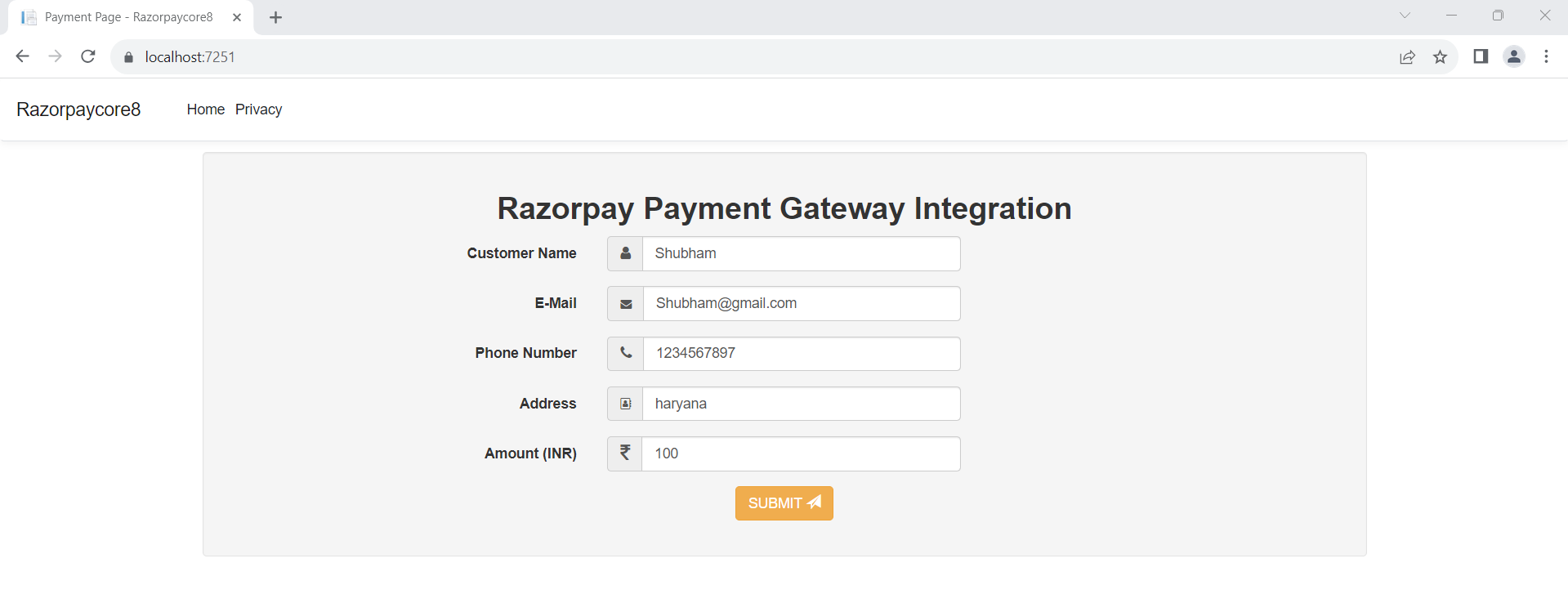
Index.cshtml that holds the payment page information.
@model Razorpaycore8.Models.PaymentRequest
@{
    ViewData["Title"] = "Payment Page";
}
<link rel="stylesheet" href="https://maxcdn.bootstrapcdn.com/bootstrap/3.2.0/css/bootstrap.min.css">
<link rel="stylesheet" href="https://cdnjs.cloudflare.com/ajax/libs/font-awesome/4.7.0/css/font-awesome.min.css">
    <form class="well form-horizontal" asp-action="ProcessRequestOrder" method="post" id="contact_form">
        <center><h2><b>Razorpay Payment Gateway Integration</b></h2></center>
        <div class="form-group">
            <label class="col-md-4 control-label">Customer Name</label>
            <div class="col-md-4 inputGroupContainer">
                <div class="input-group">
                    <span class="input-group-addon"><i class="fa fa-user"></i></span>
                    <input placeholder="Name" class="form-control" type="text" asp-for="Name" autocomplete="off" required>
                </div>
            </div>
        </div>
        <div class="form-group">
            <label class="col-md-4 control-label">E-Mail</label>
            <div class="col-md-4 inputGroupContainer">
                <div class="input-group">
                    <span class="input-group-addon"><i class="fa fa-envelope" style="font-size:11px"></i></span>
                    <input placeholder="E-Mail Address" class="form-control" type="text" asp-for="Email" autocomplete="off" required>
                </div>
            </div>
        </div>
        <div class="form-group">
            <label class="col-md-4 control-label">Phone Number</label>
            <div class="col-md-4 inputGroupContainer">
                <div class="input-group">
                    <span class="input-group-addon"><i class="fa fa-phone"></i></span>
                    <input placeholder="Phone" class="form-control" type="text" asp-for="PhoneNumber" autocomplete="off" required>
                </div>
            </div>
        </div>
        <div class="form-group">
            <label class="col-md-4 control-label">Address</label>
            <div class="col-md-4 inputGroupContainer">
                <div class="input-group">
                    <span class="input-group-addon"><i class="fa fa-address-book-o" style="font-size:11px"></i></span>
                    <input placeholder="Address" class="form-control" type="text" asp-for="Address" autocomplete="off" required>
                </div>
            </div>
        </div>
        <div class="form-group">
            <label class="col-md-4 control-label">Amount (INR)</label>
            <div class="col-md-4 inputGroupContainer">
                <div class="input-group">
                    <span class="input-group-addon"><i class="fa fa-inr" style="font-size:19px"></i></span>
                    <input placeholder="Amount (INR)" class="form-control" type="text" asp-for="Amount" autocomplete="off" required>
                </div>
            </div>
        </div>
        <div class="form-group">
            <label class="col-md-4 control-label"></label>
            <div class="col-md-4" style="text-align:center;">
                <button type="submit" class="btn btn-warning">SUBMIT <span class="glyphicon glyphicon-send"></span></button>
            </div>
        </div>
    </form>
Create payment.cshtml page
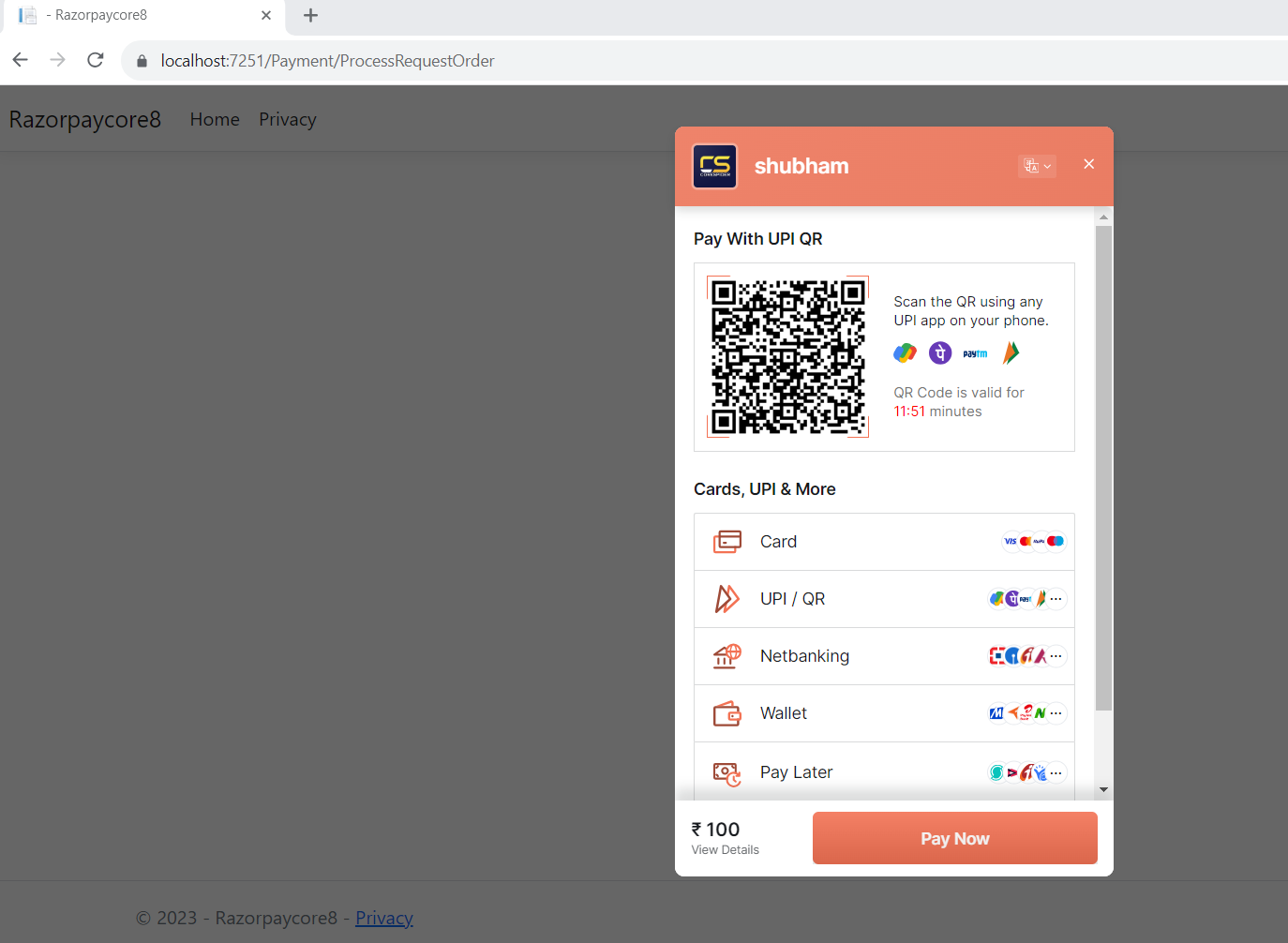
After input all the information then click on Submit button it redirect to payment.cshtml page like below;
@model Razorpaycore8.Models.MerchantOrder
<button id="RzP_btn" hidden>Pay</button>
<script src="https://checkout.razorpay.com/v1/checkout.js"></script>
<script>
    var options = {
        "key": "@Html.DisplayFor(model => model.RazorpayKey)", // Enter the Key ID generated from the Dashboard
        "amount": "@Html.DisplayFor(model => model.Amount)", // Amount is in currency subunits. Default currency is INR. Hence, 50000 refers to 50000 paise
        "currency": "@Html.DisplayFor(model => model.Currency)",
        "name": "@Html.DisplayFor(model => model.Name)",
        "description": "@Html.DisplayFor(model => model.Description)",
        "image": "https://avatars.githubusercontent.com/u/65504583?v=4", // You can give your logo url
        "order_id": "@Html.DisplayFor(model => model.OrderId)",
        "handler": function (response){
            // After payment successfully made response will come here
            // Set the data in hidden form
            document.getElementById('rzp_paymentid').value = response.razorpay_payment_id;
            document.getElementById('rzp_orderid').value = response.razorpay_order_id;
            // // Let's submit the form automatically
            document.getElementById('rzp-paymentresponse').click();
        },
        "prefill": {
            "name": "@Html.DisplayFor(model => model.Name)",
            "email": "@Html.DisplayFor(model => model.Email)",
            "contact": "@Html.DisplayFor(model => model.PhoneNumber)"
        },
        "notes": {
            "address": "@Html.DisplayFor(model => model.Address)"
        },
        "theme": {
            "color": "#F37254"
        }
    };
        var rzp1 = new Razorpay(options);
        //<!-- onload function -->
        window.onload = function(){
            document.getElementById('RzP_btn').click();
        };
        document.getElementById('RzP_btn').onclick = function(e){
        rzp1.open();
        e.preventDefault();
    }
</script>
<form action="CompleteOrderProcess" method="post" asp-antiforgery="true">
    <input type="hidden" id="rzp_paymentid" name="rzp_paymentid" />
    <input type="hidden" id="rzp_orderid" name="rzp_orderid" />
    <button type="submit" id="rzp-paymentresponse" class="btn btn-primary" hidden>Submit</button>
</form>