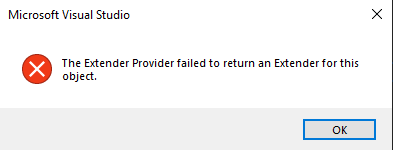
The Extender Provider failed to return an Extender for this object
What is the Extender Provider?
The Extender Provider is a design-time component in Visual Studio that allows developers to extend the functionality of existing controls. It provides additional properties, methods, and events to controls that may not be natively available. This is particularly useful for creating custom controls that require additional behavior or properties beyond the standard offerings.
For instance, if you are developing a custom user control that needs to expose specific properties to the designer, you would implement an Extender Provider. This enables designers to interact with your control in a more intuitive way, enhancing the overall user experience.
Why Does This Error Occur?
The error 'The Extender Provider failed to return an Extender for this object' typically occurs when Visual Studio cannot find or load the Extender Provider associated with a control. This can happen for several reasons:
- Missing or Corrupt Assemblies: If the assembly that contains the Extender Provider is missing or corrupted, Visual Studio will not be able to retrieve the necessary information.
- Improper Configuration: The Extender Provider may not be correctly configured in the project settings, leading to issues during design-time.
- Designer Issues: Sometimes, the Visual Studio designer itself may encounter issues that prevent it from loading the Extender Provider.
Common Solutions
When faced with this error, there are several common solutions that developers can try:
- Close and Reopen the Solution: Sometimes, simply closing and reopening the project or solution in Visual Studio can resolve transient issues.
- Clean the Project: Deleting the
objandbindirectories from the problematic project can help. These directories contain compiled files and caches that may be causing the issue. - Restart Visual Studio: Restarting the IDE can clear temporary states that may be contributing to the error.
// Example: Cleaning a project in Visual Studio
// Manually delete the 'obj' and 'bin' folders
Directory.Delete(Path.Combine(projectPath, "bin"), true);
Directory.Delete(Path.Combine(projectPath, "obj"), true);
Debugging the Extender Provider
If the above solutions do not resolve the issue, you may need to debug the Extender Provider itself. This can be done by ensuring that the provider is correctly implemented and registered. Here are some steps to help you debug:
- Check Registration: Ensure that the Extender Provider is correctly registered in your assembly. This typically involves using attributes to indicate the Extender Provider.
- Verify Implementation: Double-check the implementation of your Extender Provider to ensure it is returning the expected values.
- Use Debugging Tools: Utilize Visual Studio's debugging tools to step through the code and identify where the failure occurs.
// Example: Registering an Extender Provider
[ProvideProperty("CustomProperty", typeof(MyControl))]
public class MyExtenderProvider : Component, IExtenderProvider
{
    public bool CanExtend(object extendee)
    {
        return extendee is MyControl;
    }

    // Implementation of the Extender
}
Edge Cases & Gotchas
While working with Extender Providers, developers may encounter certain edge cases and gotchas:
- Inheritance Issues: If your Extender Provider is inherited from a base class, ensure that the base class is properly implemented and registered.
- Versioning Conflicts: Conflicts may arise if multiple versions of an assembly are loaded. Ensure that the correct version is referenced in your project.
- Threading Issues: Be cautious of threading issues that may arise when the Extender Provider is accessed from different threads.
Performance & Best Practices
To ensure optimal performance and avoid common pitfalls when working with Extender Providers, consider the following best practices:
- Minimize Overhead: Keep the Extender Provider lightweight. Avoid complex logic that could slow down the designer experience.
- Use Lazy Loading: Consider implementing lazy loading for properties that may not be needed immediately. This can improve performance.
- Thorough Testing: Test your Extender Provider in different scenarios to ensure it behaves as expected in the designer.
Conclusion
In conclusion, the error 'The Extender Provider failed to return an Extender for this object' can be resolved through various methods, including cleaning your project and debugging the Extender Provider itself. By understanding the role of Extender Providers and following best practices, developers can create more robust and user-friendly controls.
- Key Takeaways:
- Extender Providers enhance the functionality of controls in Visual Studio.
- Common solutions include cleaning the project and restarting Visual Studio.
- Debugging is essential for resolving complex issues with Extender Providers.
- Adopting best practices can significantly improve performance and reliability.