
Complete Guide to Array Lists in Java with Examples
ArrayList in Java
The ArrayList class in Java is a resizable array implementation of the List interface. Unlike traditional arrays that have a fixed size, ArrayLists can grow or shrink dynamically, which makes them highly versatile for various applications. As part of the Java Collections Framework, ArrayLists come with a rich set of methods that simplify the manipulation of data stored within them.
ArrayLists are particularly useful in scenarios where the number of elements is unknown at compile time. For instance, when processing user input or reading data from a file, using an ArrayList allows developers to easily adjust the size of the collection as needed. This flexibility is one of the reasons why ArrayLists are widely used in Java programming.
Declaration and Initialization
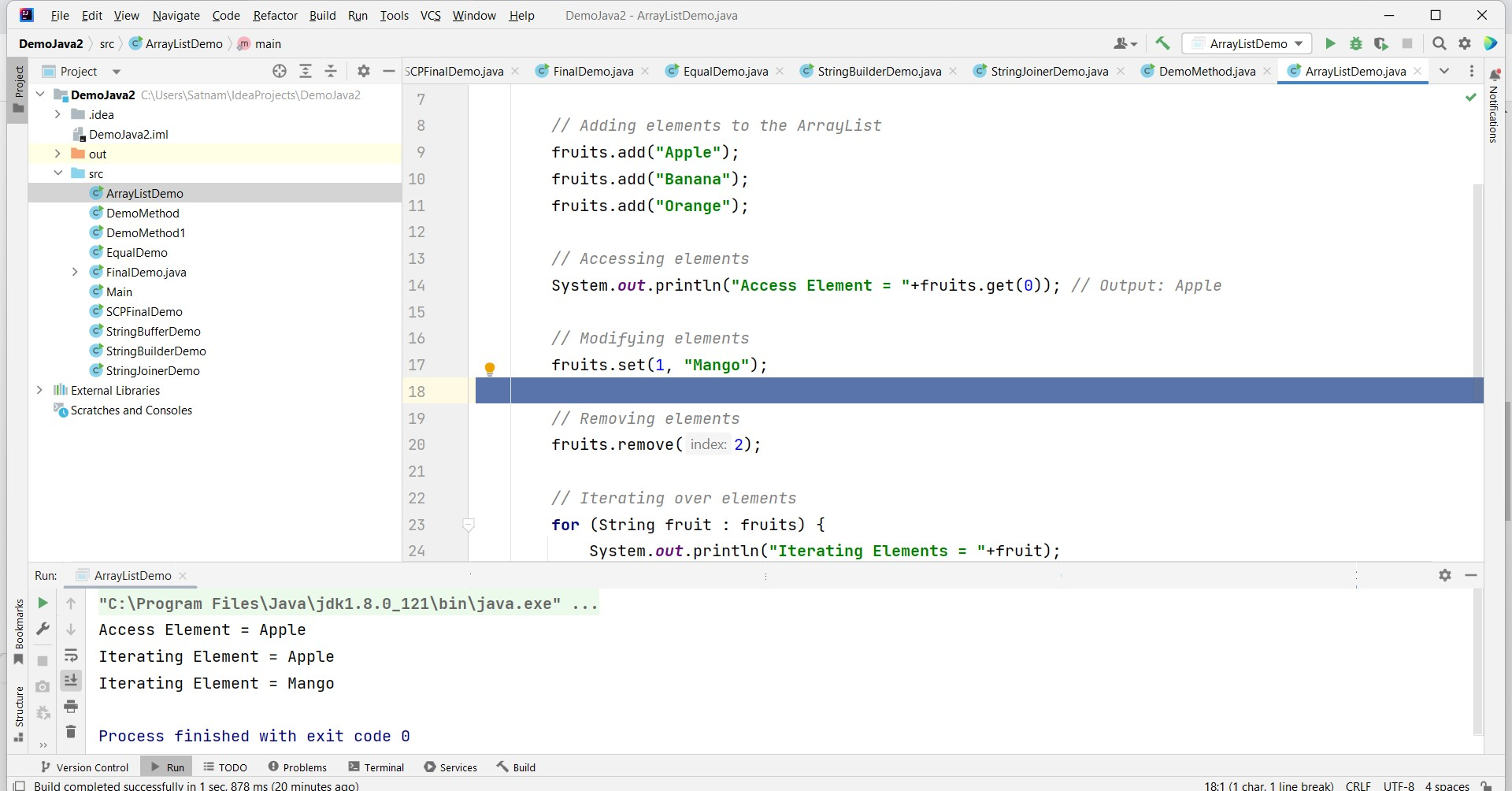
To use an ArrayList in Java, you need to import the java.util.ArrayList package. Below is an example of how to declare and initialize an ArrayList:
import java.util.ArrayList;

public class Example {
    public static void main(String[] args) {
        ArrayList<String> fruits = new ArrayList<>();

        // Adding elements to the ArrayList
        fruits.add("Apple");
        fruits.add("Banana");
        fruits.add("Orange");

        // Accessing elements
        System.out.println("Access Element = " + fruits.get(0)); // Output: Apple

        // Modifying elements
        fruits.set(1, "Mango");

        // Removing elements
        fruits.remove(2);

        // Iterating over elements
        for (String fruit : fruits) {
            System.out.println("Iterating Elements = " + fruit);
        }
    }
}
In this example, we create an ArrayList of type String to store names of fruits. We demonstrate adding, accessing, modifying, and removing elements, as well as iterating over the ArrayList to display its contents.
Common ArrayList Operations
ArrayLists provide a variety of methods for manipulating the elements stored in them. Here are some commonly used operations:
- add(element): Adds an element to the end of the ArrayList.
- get(index): Retrieves the element at the specified index.
- set(index, element): Replaces the element at the specified index with a new element.
- remove(index): Removes the element at the specified index.
- size(): Returns the number of elements in the ArrayList.
- isEmpty(): Checks if the ArrayList is empty.
- clear(): Removes all elements from the ArrayList.
These methods make it easy to manage collections of data. For example, if you need to store a list of user names and later update or delete them, ArrayLists allow for quick and efficient operations.
Advanced ArrayList Features
ArrayLists also support several advanced features that enhance their functionality. One of these features is the ability to sort the elements within the ArrayList using the Collections.sort() method. Here’s an example:
import java.util.ArrayList;
import java.util.Collections;

public class SortExample {
    public static void main(String[] args) {
        ArrayList<String> names = new ArrayList<>();
        names.add("John");
        names.add("Alice");
        names.add("Bob");

        // Sorting the ArrayList
        Collections.sort(names);

        // Displaying sorted names
        for (String name : names) {
            System.out.println(name);
        }
    }
}
In this code, we create an ArrayList of names and use the Collections.sort() method to sort them in natural order. This feature is particularly useful when you need to present data in a specific order.
Thread Safety and Synchronization
One important consideration when using ArrayLists is their lack of thread safety. Multiple threads accessing an ArrayList concurrently can lead to inconsistent results and potential data corruption. If you are working in a multi-threaded environment, consider using Collections.synchronizedList() to create a synchronized version of your ArrayList:
import java.util.ArrayList;
import java.util.Collections;
import java.util.List;

public class SynchronizedListExample {
    public static void main(String[] args) {
        List<String> synchronizedList = Collections.synchronizedList(new ArrayList<>());
        synchronizedList.add("Apple");
        synchronizedList.add("Banana");

        synchronized (synchronizedList) {
            for (String fruit : synchronizedList) {
                System.out.println(fruit);
            }
        }
    }
}
In this example, we create a synchronized version of the ArrayList, which ensures that only one thread can access it at a time, preventing concurrent modification issues.
Edge Cases & Gotchas
While ArrayLists are powerful, there are some edge cases and gotchas to be aware of:
- IndexOutOfBoundsException: Accessing an index that is out of bounds will throw this exception. Always ensure that the index is valid before accessing elements.
- Performance with Large Data Sets: ArrayLists can become inefficient with large data sets due to resizing. When the capacity is exceeded, a new array is created, and elements are copied over, which can be time-consuming.
- Null Elements: ArrayLists allow null elements, which can lead to NullPointerException if not handled properly during operations.
Performance & Best Practices
When using ArrayLists, it's crucial to follow best practices to ensure optimal performance:
- Initial Capacity: If you know the approximate size of the ArrayList beforehand, specify an initial capacity to minimize resizing overhead. For example:
ArrayList<String> list = new ArrayList<(initialCapacity)>; - Use Generics: Always use generics with ArrayLists to avoid casting issues and improve type safety. For instance, use
ArrayList<String>instead ofArrayList. - Minimize Calls to Size(): If you frequently need the size of the ArrayList, store it in a variable instead of calling
size()repeatedly, as it can be an expensive operation.
Conclusion
ArrayLists are a fundamental part of Java programming, providing a flexible and dynamic way to manage collections of data. They are easy to use and come with a variety of methods that enhance their functionality.
- ArrayLists are resizable arrays that implement the List interface.
- They provide various methods for adding, removing, and modifying elements.
- Thread safety should be considered when using ArrayLists in multi-threaded applications.
- Best practices include specifying initial capacity and using generics for type safety.
