
Complete Guide to HashSet in Java with Examples and Best Practices
HashSet in Java
HashSet is a part of the Java Collections Framework and is an implementation of the Set interface. It provides a collection that does not allow duplicate elements and has no specific order for its elements. HashSet is based on a hash table data structure, which makes it efficient for adding, removing, and searching for elements in constant time (O(1)) on average. This efficiency is particularly beneficial in applications where performance is critical.
One of the primary use cases for HashSet is in scenarios where you need to ensure that a collection contains only unique items. For instance, when processing user input, you might want to eliminate duplicates to maintain clean data. HashSet is also commonly used in algorithms that require fast lookups, such as checking for the existence of an item in a collection.
Declaration and Initialization
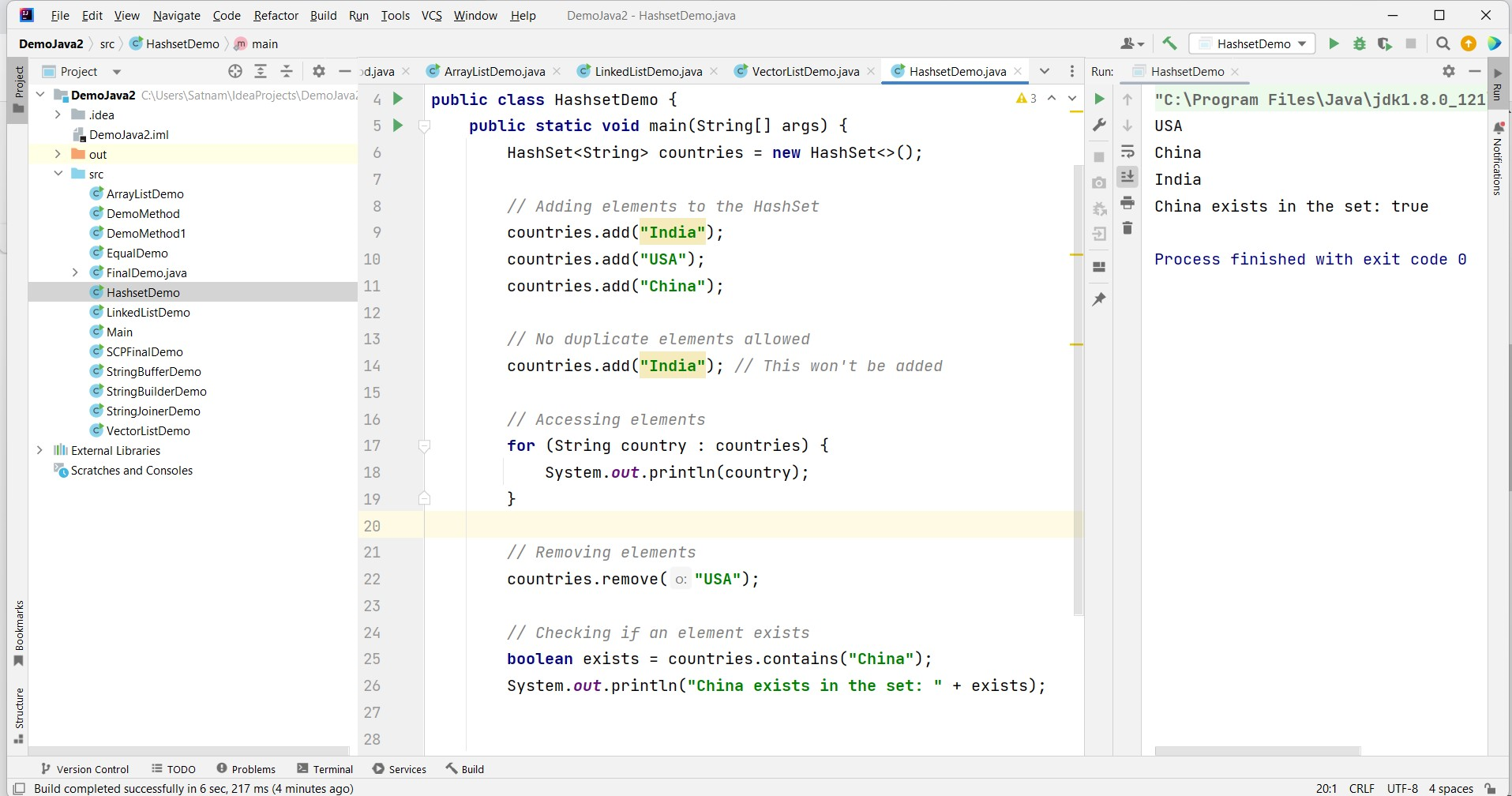
To use a HashSet in Java, you need to import the java.util.HashSet package. Here's an example of declaring and initializing a HashSet:
import java.util.HashSet;

public class Example {
    public static void main(String[] args) {
        HashSet<String> countries = new HashSet<>();
        // Adding elements to the HashSet
        countries.add("India");
        countries.add("USA");
        countries.add("China");
        // No duplicate elements allowed
        countries.add("India"); // This won't be added

        // Accessing elements
        for (String country : countries) {
            System.out.println(country);
        }

        // Removing elements
        countries.remove("USA");

        // Checking if an element exists
        boolean exists = countries.contains("China");
        System.out.println("China exists in the set: " + exists);
    }
}
Common HashSet Operations
Here are some commonly used operations with HashSets:
add(element): Adds an element to the HashSet.remove(element): Removes an element from the HashSet.contains(element): Checks if the HashSet contains a specific element.size(): Returns the number of elements in the HashSet.isEmpty(): Checks if the HashSet is empty.clear(): Removes all elements from the HashSet.
HashSet is a widely used data structure when the requirement is to maintain a unique set of elements without any order. It is an excellent choice for tasks that involve checking for existence or eliminating duplicates from a collection of elements.
Iterating Over a HashSet
Iterating over a HashSet can be done using various methods such as enhanced for-loops, iterators, or streams. Each method has its own advantages depending on the use case.
The enhanced for-loop is straightforward and easy to read, while the iterator provides more control, allowing you to remove elements during iteration. Streams offer a functional approach, enabling operations like filtering and mapping.
import java.util.HashSet;
import java.util.Iterator;

public class IterateExample {
    public static void main(String[] args) {
        HashSet<String> countries = new HashSet<>();
        countries.add("India");
        countries.add("USA");
        countries.add("China");

        // Using enhanced for-loop
        for (String country : countries) {
            System.out.println(country);
        }

        // Using iterator
        Iterator<String> iterator = countries.iterator();
        while (iterator.hasNext()) {
            System.out.println(iterator.next());
        }

        // Using streams
        countries.stream().forEach(System.out::println);
    }
}
HashSet vs. Other Set Implementations
Java provides several implementations of the Set interface, including HashSet, LinkedHashSet, and TreeSet. The choice of which to use depends on the specific requirements of your application.
HashSet is the most efficient for basic operations, but it does not maintain any order. LinkedHashSet maintains the insertion order, making it useful when you need to preserve the order of elements. TreeSet maintains a sorted order and is backed by a red-black tree, offering logarithmic time complexity for basic operations.
import java.util.HashSet;
import java.util.LinkedHashSet;
import java.util.TreeSet;

public class SetComparison {
    public static void main(String[] args) {
        HashSet<String> hashSet = new HashSet<>();
        LinkedHashSet<String> linkedHashSet = new LinkedHashSet<>();
        TreeSet<String> treeSet = new TreeSet<>();

        hashSet.add("Banana");
        hashSet.add("Apple");
        hashSet.add("Mango");

        linkedHashSet.add("Banana");
        linkedHashSet.add("Apple");
        linkedHashSet.add("Mango");

        treeSet.add("Banana");
        treeSet.add("Apple");
        treeSet.add("Mango");

        System.out.println("HashSet: " + hashSet);
        System.out.println("LinkedHashSet: " + linkedHashSet);
        System.out.println("TreeSet: " + treeSet);
    }
}
Edge Cases & Gotchas
While working with HashSet, there are some edge cases and gotchas to be aware of:
- Null Elements: HashSet allows one null element. Attempting to add multiple nulls will result in only one being retained.
- Custom Objects: When using custom objects as elements, ensure that
equals()andhashCode()methods are overridden. Failure to do so can lead to unpredictable behavior. - Concurrent Modification: Modifying a HashSet while iterating over it using an iterator will throw a
ConcurrentModificationException. Always use the iterator'sremove()method to remove elements during iteration.
Performance & Best Practices
HashSet is generally very performant due to its underlying hash table implementation. However, there are some best practices to ensure optimal performance:
- Initial Capacity and Load Factor: When creating a HashSet, consider specifying an initial capacity and load factor to reduce the number of rehash operations. This is particularly useful when you know the approximate size of the set.
- Avoiding Hash Collisions: When designing custom objects for use in HashSet, ensure that the
hashCode()method distributes hash codes uniformly to avoid performance degradation due to collisions. - Use the Right Set Implementation: Choose HashSet when you need fast operations without order, but consider LinkedHashSet or TreeSet if order matters.
Conclusion
In summary, HashSet is a versatile and efficient data structure for managing unique elements in Java. Its average constant time complexity for basic operations makes it a preferred choice for many applications.
- HashSet does not allow duplicate elements.
- It has no specific order for its elements.
- Custom objects must implement
equals()andhashCode()methods for predictable behavior. - Be mindful of edge cases such as null elements and concurrent modifications.
- Follow best practices for optimal performance.
