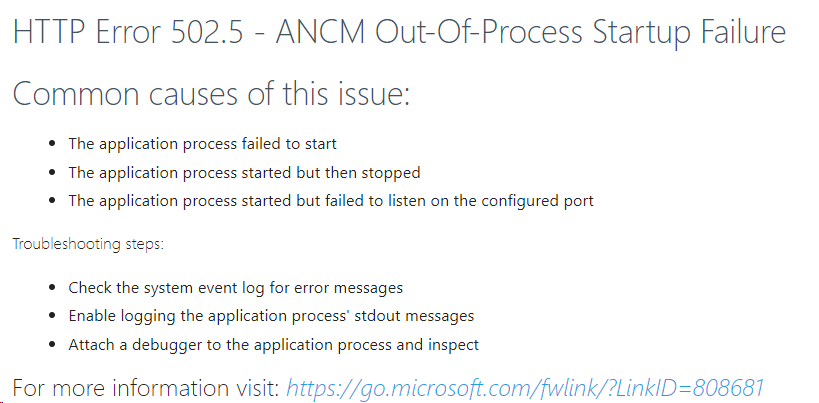
HTTP Error 502.5 - ANCM Out Of Process Startup Failure
Understanding HTTP Error 502.5 - ANCM Out-Of-Process Startup Failure
The HTTP Error 502.5 indicates that the ASP.NET Core Module (ANCM) is unable to start the application process. This situation can arise from various reasons, including misconfigurations, missing dependencies, or issues with the application itself. It's essential to diagnose the problem accurately to implement the correct solution.
This error typically occurs after updates to the system, changes to the application, or when deploying a new version. By understanding the underlying causes, you can quickly resolve the issue and ensure your application is accessible to users.
Prerequisites
Before diving into troubleshooting, ensure that you have the following prerequisites in place:
- .NET Core SDK and Runtime: Make sure you have the correct version of the .NET Core SDK and runtime installed. For ASP.NET Core 2.2 applications, you should install .NET Core 2.2 SDK and runtime.
- IIS Configuration: Ensure that IIS is correctly configured to host ASP.NET Core applications, including the ASP.NET Core Module.
- Application Permissions: Verify that the application pool identity has the necessary permissions to access the application files and directories.
Step 1: Install the Required .NET Core SDK and Runtime
The first step in resolving HTTP Error 502.5 is to ensure that the correct version of .NET Core SDK and runtime is installed on your server. You can download the necessary version from the official .NET website. For ASP.NET Core 2.2 applications, follow these steps:
- Visit the Download .NET Core 2.2 page.
- Select the appropriate SDK version (e.g., ASP.NET Core 2.2.8 SDK) and download it.
Once downloaded, install the SDK and runtime on your machine. After installation, it's crucial to verify that they were installed correctly.
dotnet --list-runtimesThe expected output should resemble the following:
Microsoft.AspNetCore.All 2.2.8 [C:\Program Files\dotnet\shared\Microsoft.AspNetCore.All]
Microsoft.AspNetCore.App 2.2.8 [C:\Program Files\dotnet\shared\Microsoft.AspNetCore.App]
Microsoft.NETCore.App 2.2.8 [C:\Program Files\dotnet\shared\Microsoft.NETCore.App]
Step 2: Restart Your System
After installing the necessary SDK and runtime, it's often beneficial to restart your system. This action ensures that all environment variables and configurations are loaded correctly. Sometimes, lingering processes can interfere with the application startup, and a fresh restart can help clear these issues.
Step 3: Check Application Pool Identity Permissions
If the error persists after verifying the SDK and restarting your system, the next step is to check the application pool identity settings in IIS. The application pool identity must have sufficient permissions to access the application files.
To modify the application pool identity:
- Open IIS Manager.
- Locate your application pool in the "Application Pools" section.
- Right-click on the application pool and select "Advanced Settings."
- Change the "Identity" from the default to "Local System" to grant full permissions.
Additionally, ensure that the "Enable 32-bit applications" option is set to true if your application is targeting a 32-bit architecture.
Common Troubleshooting Steps
If you continue to encounter the HTTP Error 502.5, consider the following troubleshooting steps:
- Check Event Logs: Review the Windows Event Viewer for any logs related to the application startup. This can provide valuable insights into the underlying issues.
- Inspect Application Logs: If your application has logging enabled, check the application logs for any errors that could indicate misconfigurations or missing dependencies.
- Run Application Locally: Test running the application locally using the command line to identify any runtime errors that may not surface when running through IIS.
Edge Cases & Gotchas
There are several edge cases and potential pitfalls to be aware of when dealing with HTTP Error 502.5:
- Framework Version Mismatch: Ensure that the application is targeting the correct framework version. An ASP.NET Core application targeting a higher version than what is installed will fail to start.
- Environmental Variables: Check if there are any required environmental variables that need to be set for your application to function correctly.
- Firewall or Security Software: Sometimes, security software can block the application from starting or accessing necessary resources. Ensure that your firewall or antivirus settings are correctly configured.
Performance & Best Practices
To ensure optimal performance and avoid HTTP Error 502.5 in the future, consider the following best practices:
- Regular Updates: Keep your .NET Core SDK and runtime updated to the latest stable version to benefit from performance improvements and security patches.
- Use Application Insights: Implement Application Insights to monitor your application’s performance and quickly identify any issues that may arise.
- Optimize Application Configuration: Review your application's configuration settings to ensure they are optimized for performance. This includes connection strings, logging levels, and caching strategies.
Conclusion
Encountering HTTP Error 502.5 - ANCM Out-Of-Process Startup Failure can be frustrating, but understanding its causes and solutions can help you resolve the issue efficiently. Here are the key takeaways:
- Ensure the correct version of .NET Core SDK and runtime is installed.
- Restart your system after making changes to configurations or installations.
- Verify application pool identity permissions in IIS.
- Monitor application and event logs for insights into errors.
- Follow best practices to optimize performance and reduce the likelihood of encountering this error in the future.