
Payout using Paypal Payment Gateway
Overview of PayPal Payouts
PayPal payouts are a crucial feature for businesses that need to send money to multiple recipients efficiently. This can include scenarios such as affiliate payments, vendor payments, or even payroll. By utilizing the PayPal payment gateway, you can automate the process of sending funds, ensuring timely and accurate transactions. PayPal provides a robust API that allows developers to integrate payout functionalities into their applications seamlessly.
Using PayPal for payouts not only improves the user experience but also increases trust and reliability in financial transactions. With millions of users globally, PayPal is a recognized name in digital payments, making it a preferred choice for many businesses.
Prerequisites
Before you begin implementing PayPal payouts in your ASP.NET Core application, ensure that you have the following prerequisites:
- A PayPal business account: You need to have a business account to access the PayPal API features.
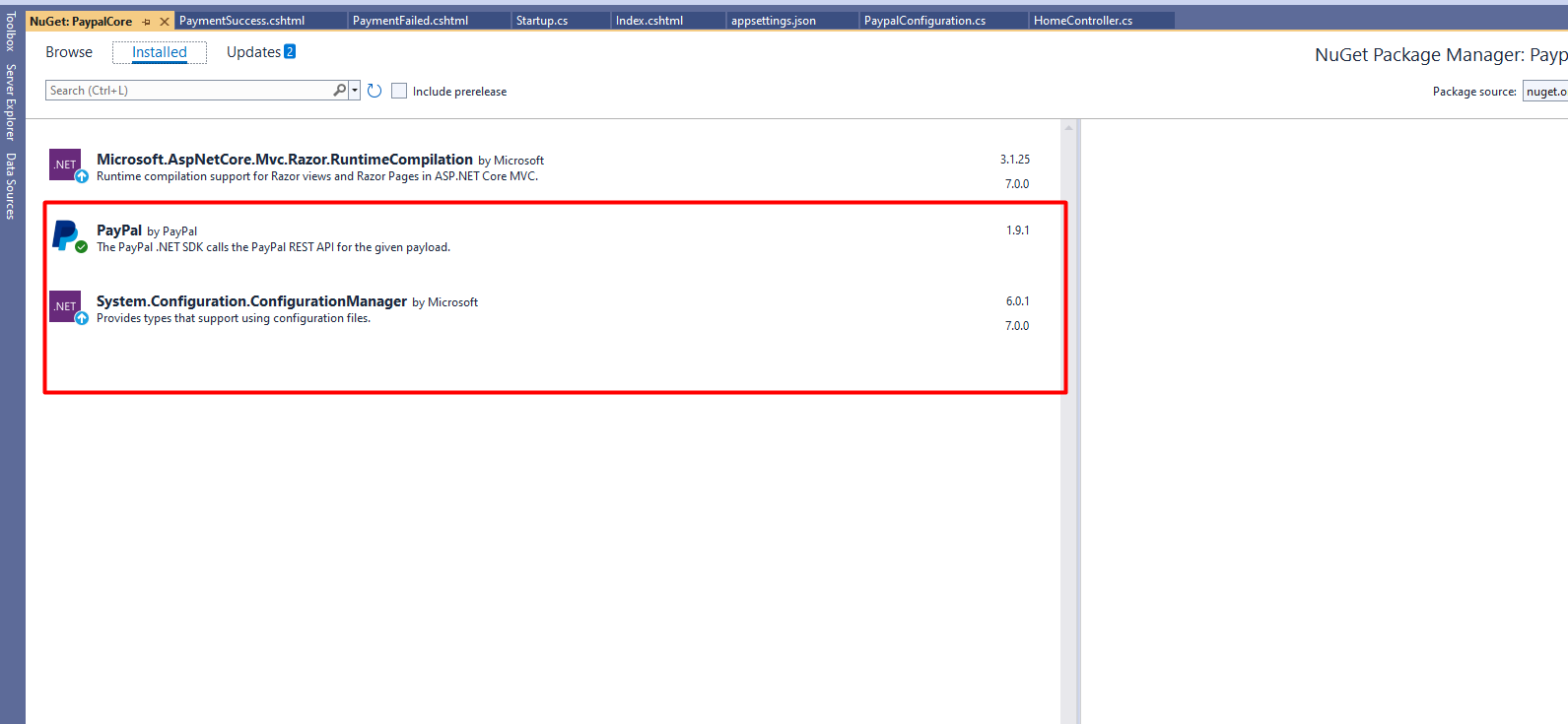
- NuGet packages: Install the necessary PayPal SDK packages to facilitate communication with the PayPal API.
- ASP.NET Core application: You should have a basic ASP.NET Core application set up to integrate the PayPal functionality.
Setting Up Your ASP.NET Core Application
To get started, you need to install the PayPal SDK for .NET. Use the following command in your Package Manager Console:
Install-Package PayPalAfter installing the necessary packages, you'll need to configure your application to include PayPal credentials. This can be done in the appsettings.json file. Here’s how you can set it up:
{
  "PayPal": {
    "Key": "YOUR_PAYPAL_CLIENT_ID",
    "Secret": "YOUR_PAYPAL_CLIENT_SECRET",
    "mode": "sandbox"
  }
}
Make sure to replace YOUR_PAYPAL_CLIENT_ID and YOUR_PAYPAL_CLIENT_SECRET with your actual PayPal API credentials. The mode can be set to sandbox for testing purposes, and you can switch to live when you're ready to go into production.
Implementing Payout Functionality
With your application set up, you can now implement the payout functionality. Below is an example of a simple controller that handles PayPal payouts:
public class HomeController : Controller {
    private readonly ILogger<HomeController> _logger;
    private IHttpContextAccessor httpContextAccessor;
    private IConfiguration _configuration;

    public HomeController(ILogger<HomeController> logger, IHttpContextAccessor context, IConfiguration iconfiguration) {
        _logger = logger;
        httpContextAccessor = context;
        _configuration = iconfiguration;
    }

    public IActionResult Index() {
        return View();
    }

    public ActionResult PaymentWithPaypal(string Cancel = null, string blogId = "", string PayerID = "", string guid = "") {
        var ClientID = _configuration.GetValue<string>("PayPal:Key");
        var ClientSecret = _configuration.GetValue<string>("PayPal:Secret");
        var mode = _configuration.GetValue<string>("PayPal:mode");
        APIContext apiContext = PaypalConfiguration.GetAPIContext(ClientID, ClientSecret, mode);
        var payout = new Payout() {
            items = new List<PayoutItem> {
                new PayoutItem {
                    receiver = "receiver@example.com",
                    amount = new Currency { currency = "usd", value = "1.00" },
                    note = "Test payout",
                    recipient_type = PayoutRecipientType.EMAIL,
                    sender_item_id = Guid.NewGuid().ToString()
                }
            }
        };
        payout.sender_batch_header = new PayoutSenderBatchHeader {
            sender_batch_id = Guid.NewGuid().ToString(),
            email_subject = "You have a payout!"
        };
        var response = payout.Create(apiContext);
        return View("PaymentSuccess");
    }
}
In this example, we create a new payout and specify the recipient's email, amount, and other necessary details. The payout is then sent to the PayPal API for processing.
Understanding Payout Recipient Types
When making a payout, you can specify the recipient type. PayPal supports several recipient types, including:
- PayoutRecipientType.EMAIL: Use this when you want to send funds to a recipient's PayPal email address.
- PayoutRecipientType.PAYPAL_ACCOUNT_ID: This option allows you to send funds directly to a recipient's PayPal account ID.
- PayoutRecipientType.PHONE: You can also send payouts to a recipient's phone number if they have linked their phone to their PayPal account.
Choosing the correct recipient type is crucial to ensure that the funds reach the intended recipient without any issues.
Error Handling and Debugging Payouts
When working with PayPal payouts, you may encounter various errors. It is essential to implement error handling to manage these scenarios effectively. Common errors include:
- Insufficient funds: Ensure that your PayPal account has enough balance to cover the payout.
- Invalid recipient: Verify that the recipient's information is accurate to avoid failed transactions.
- API errors: Handle exceptions that may arise from API calls to ensure a smooth user experience.
To handle errors gracefully, you can implement try-catch blocks around your payout logic. Here's an example:
try {
    var response = payout.Create(apiContext);
} catch (PayPalException ex) {
    // Handle the exception, log the error, and provide feedback to the user.
    _logger.LogError(ex.Message);
}
Edge Cases & Gotchas
When implementing PayPal payouts, consider the following edge cases:
- Currency Conversion: If you're sending payouts in different currencies, be aware of PayPal's currency conversion fees and ensure that your application handles currency conversion appropriately.
- Account Limitations: Some PayPal accounts may have limitations on the number of payouts or the total amount that can be sent. Always check the account settings before processing large payouts.
- Recipient Status: Ensure that the recipient's PayPal account is in good standing. If the account is limited or restricted, the payout may fail.
Performance & Best Practices
To ensure optimal performance when working with PayPal payouts, consider the following best practices:
- Batch Processing: If you need to send multiple payouts, consider using batch processing to reduce the number of API calls and improve efficiency.
- Logging: Implement comprehensive logging to track payout transactions and identify issues early.
- Testing: Always test your payout implementation in the PayPal sandbox environment before going live to avoid any disruptions in your production environment.
Conclusion
In this article, we explored how to implement payouts using the PayPal payment gateway in an ASP.NET Core application. Here are the key takeaways:
- Payouts are essential for businesses needing to send money to multiple recipients efficiently.
- Proper configuration of PayPal credentials is crucial for successful integration.
- Understanding recipient types and error handling can significantly enhance the payout process.
- Implementing best practices ensures optimal performance and a smooth user experience.
