
Reading json data from file using Asp.Net
Understanding JSON and Its Importance
JSON is a lightweight data interchange format that is easy for humans to read and write, and easy for machines to parse and generate. It is commonly used in web applications for transmitting data between the client and server. JSON files can be utilized for various purposes, such as configuration files, storing application settings, or even as a simple database for small applications.
In an ASP.NET Core application, reading JSON data from files can simplify data management and enhance flexibility. For example, you might have a configuration file that stores various settings for your application, or a data file that contains information about countries, products, or users.
Prerequisites
Before diving into the code, ensure you have the following prerequisites:
- Visual Studio or any other IDE that supports ASP.NET Core.
- Basic knowledge of C# and ASP.NET Core.
- Newtonsoft.Json library installed in your project, which can be added via NuGet Package Manager.
Reading JSON Data from a File
To read JSON data from a file in an ASP.NET Core application, we will use the StreamReader class along with the Newtonsoft.Json library to deserialize the JSON content into C# objects. For this tutorial, we will create a JSON file named countrycodes.json and place it in the Content folder of the project.
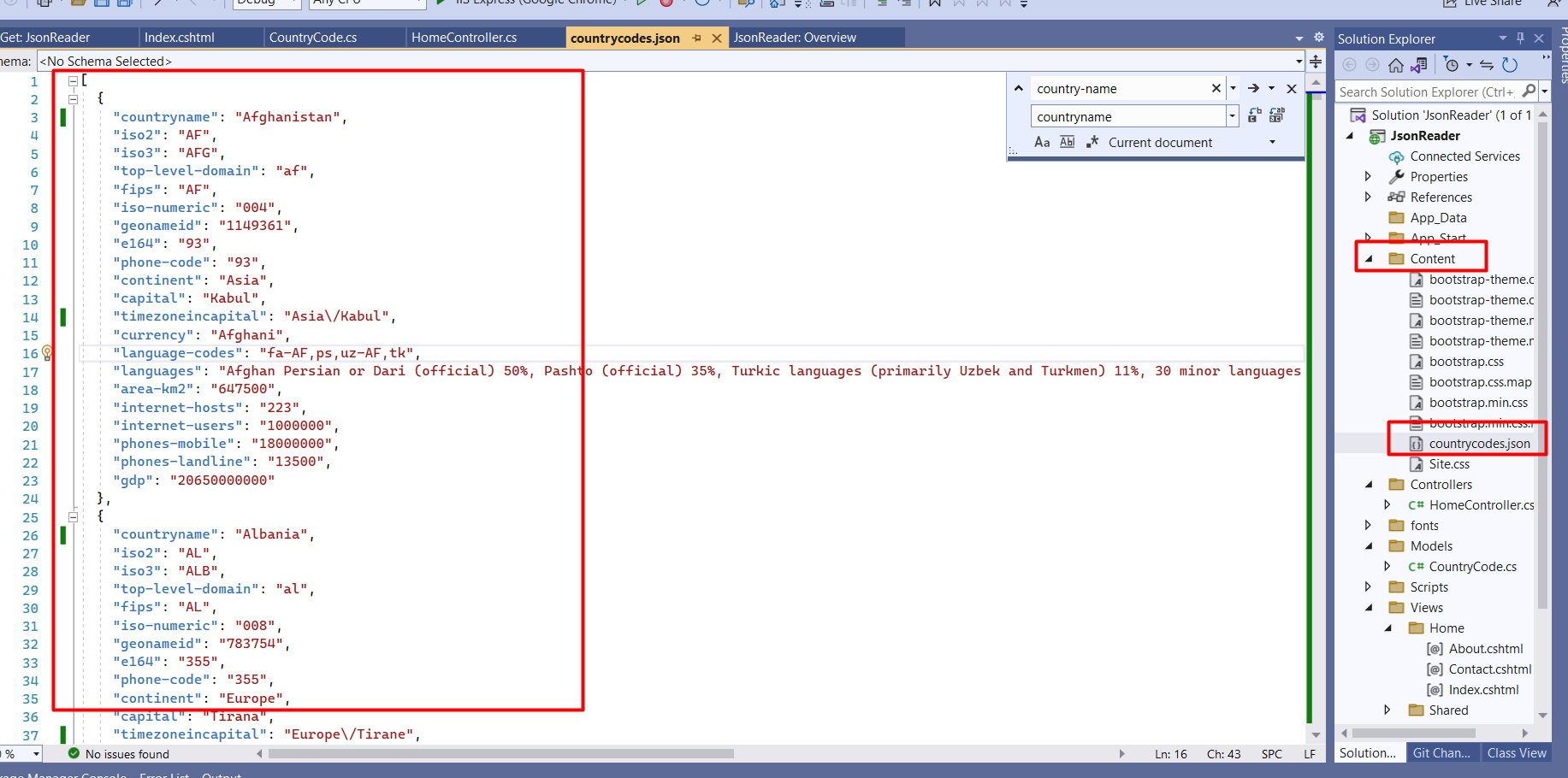
The structure of our JSON file might look something like this:
[
  {
    "countryname": "United States",
    "continent": "North America",
    "currency": "USD",
    "capital": "Washington, D.C.",
    "timezoneincapital": "UTC-5"
  },
  {
    "countryname": "Germany",
    "continent": "Europe",
    "currency": "EUR",
    "capital": "Berlin",
    "timezoneincapital": "UTC+1"
  }
]
Next, we will implement the code in our controller to read this JSON file. Below is an example of how to do this:
using JsonReader.Models;
using Newtonsoft.Json;
using System.Collections.Generic;
using System.IO;
using Microsoft.AspNetCore.Mvc;

namespace JsonReader.Controllers {
    public class HomeController : Controller {
        public IActionResult Index() {
            // Reading file from server
            List items = new List();
            using (StreamReader r = new StreamReader(Path.Combine(Directory.GetCurrentDirectory(), "Content/countrycodes.json"))) {
                string json = r.ReadToEnd();
                items = JsonConvert.DeserializeObject>(json);
            }
            return View(items);
        }
    }
}
In this code, we use StreamReader to read the contents of the JSON file and then deserialize it into a list of CountryCode objects.
Creating the CountryCode Model
To deserialize the JSON data correctly, we need to create a model that matches the structure of our JSON. Here is how you can define the CountryCode model:
namespace JsonReader.Models {
    public class CountryCode {
        public string CountryName { get; set; }
        public string Continent { get; set; }
        public string Currency { get; set; }
        public string Capital { get; set; }
        public string TimezoneInCapital { get; set; }
    }
}
Note that property names in the model should match the JSON keys. C# naming conventions typically use PascalCase, but JSON keys are often in camelCase. You can use attributes from the Newtonsoft.Json library to handle these discrepancies if needed.
Displaying the Data in the View
After reading and parsing the JSON data, the next step is to display it in a view. We can create a simple Razor view to show the country codes. Below is an example of what the view might look like:
@model List

Country Codes


            Country Name
            Continent
            Currency
            Capital
            Timezone in Capital


        @foreach (var item in Model) {

                @item.CountryName
                @item.Continent
                @item.Currency
                @item.Capital
                @item.TimezoneInCapital

        }
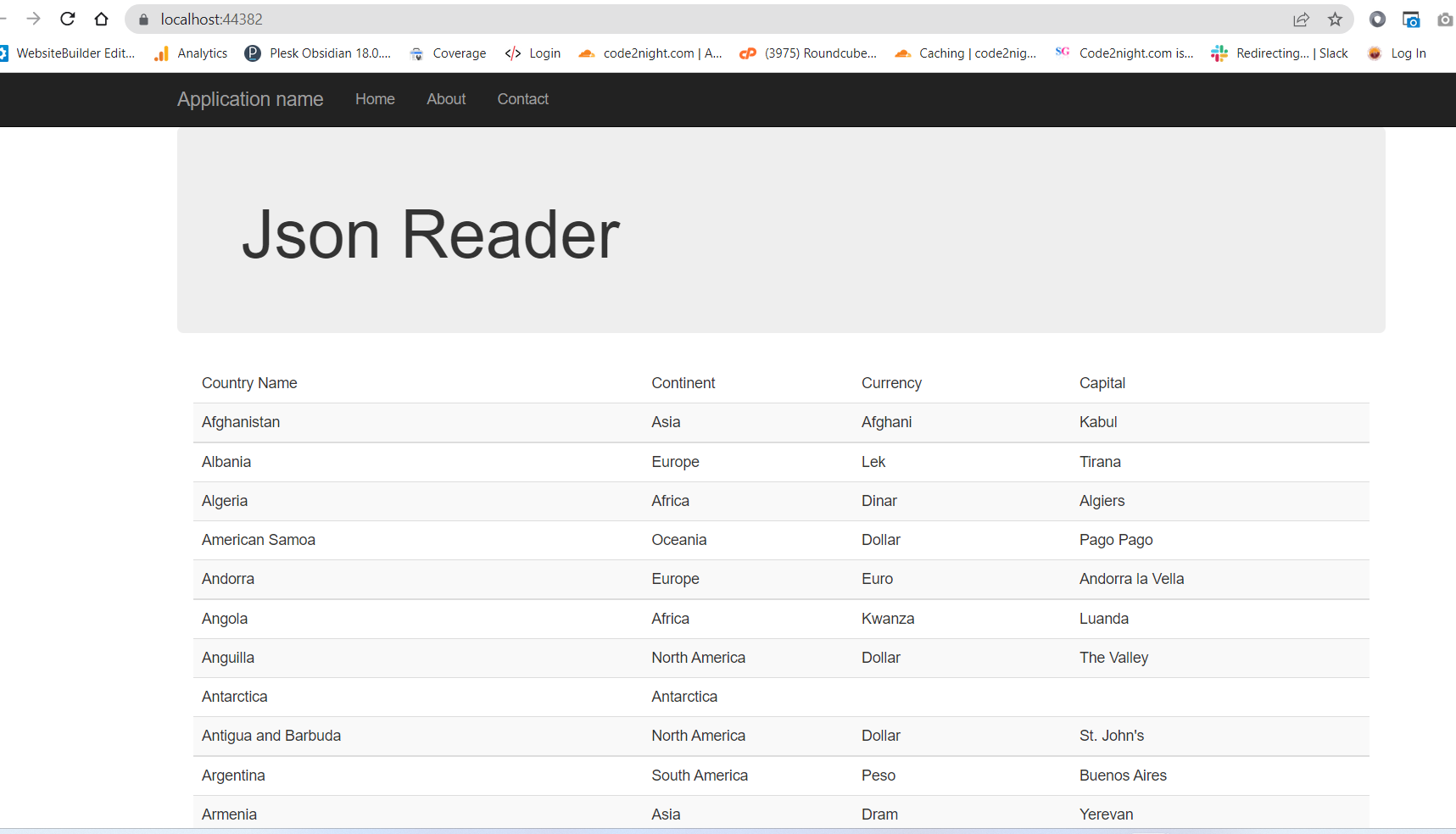
This will render a table displaying the country codes that were read from the JSON file. Make sure to run your application to see the output on the browser.
Edge Cases & Gotchas
While working with JSON files, there are several edge cases and potential issues to consider:
- File Not Found: Ensure that the JSON file path is correct. If the file cannot be found, it will throw an exception. You can implement error handling to manage this gracefully.
- Malformed JSON: If the JSON data is not well-formed, deserialization will fail. Always validate the JSON structure before reading it.
- Data Type Mismatches: Ensure that the data types in your model match those in the JSON. For example, if a field is expected to be an integer but is provided as a string, it may cause runtime errors.
Performance & Best Practices
When working with JSON in ASP.NET Core applications, it's essential to follow best practices to ensure optimal performance:
- Use Asynchronous I/O: Consider using asynchronous file reading methods to avoid blocking the main thread, especially when dealing with large files.
- Cache JSON Data: If the JSON data does not change frequently, consider caching the deserialized objects to reduce file I/O overhead.
- Validate JSON Structure: Before deserializing, validate the JSON structure to catch issues early and avoid exceptions during runtime.
- Use Strongly Typed Models: Always create models that represent the structure of your JSON data to ensure type safety and reduce errors.
Conclusion
In this tutorial, we explored how to read JSON data from a file in an ASP.NET Core application. We covered the following key points:
- JSON is a widely used format for data interchange in web applications.
- Using StreamReader and Newtonsoft.Json, we can easily read and deserialize JSON data.
- Properly structuring your models and handling edge cases can prevent runtime errors.
- Best practices, such as caching and using asynchronous methods, can enhance performance.
