
Code2night
  • Home
  • Guest Posts
  • Tutorial
  • Languages
    • Angular
    • C
    • C#
    • HTML/CSS
    • Java
    • JavaScript
    • Node.js
    • Python
    • React
    • SQL Server
    • TypeScript
  • Post Blog
  • Tools
    • JSON Beautifier
    • HTML Beautifier
    • XML Beautifier
    • CSS Beautifier
    • JS Beautifier
    • PDF Editor
  • Register
  • Login
  1. Home
  2. Blogpost

Reading Values From Appsettings.json In ASP.NET Core

Date- Sep 10,2022

5327

Free Download
appsettingsjson ASPNET Core

I have added the following JSON object in the appsetting.json file.

 {
  "Logging": {
    "LogLevel": {
      "Default": "Information",
      "Microsoft.AspNetCore": "Warning"
    }
  },
  "AllowedHosts": "*",

  "credentials": {
    "UserName": "Shubham",
    "Password": "code2night",
    "Email": "code2night@gmail.com"
  }
}

We will create a model class in which we will define properties with the same name as we have defined in our appsettings.json, Create a class inside the model folder 

    public class CredSettingsModel
    {
        public string UserName { get; set; }
        public string Password { get; set; }
        public string Email { get; set; }

    }

Go to Program.cs file and we will register our class by writing the below code.

 builder.Services.Configure<CredSettingsModel>(builder.Configuration.GetSection("credentials"));

Then we can inject it into our HomeController constructor using our IOptions instance.

using ConfigrationManager.Models;
using Microsoft.AspNetCore.Mvc;
using Microsoft.Extensions.Options;
using System.Diagnostics;

namespace ConfigrationManager.Controllers
{
    public class HomeController : Controller
    {
        private readonly ILogger<HomeController> _logger;
        protected readonly IConfiguration _configuration;
        private readonly CredSettingsModel _credSettingsModel;
        public HomeController(ILogger<HomeController> logger, IOptions<CredSettingsModel> options)
        {
            _logger = logger;
            _credSettingsModel = options.Value;
        }

        public IActionResult Index()
        {
            string UserName = _credSettingsModel.UserName;
            string Password = _credSettingsModel.Password;
            string Email = _credSettingsModel.Email;
            return View();
        }

    }
}

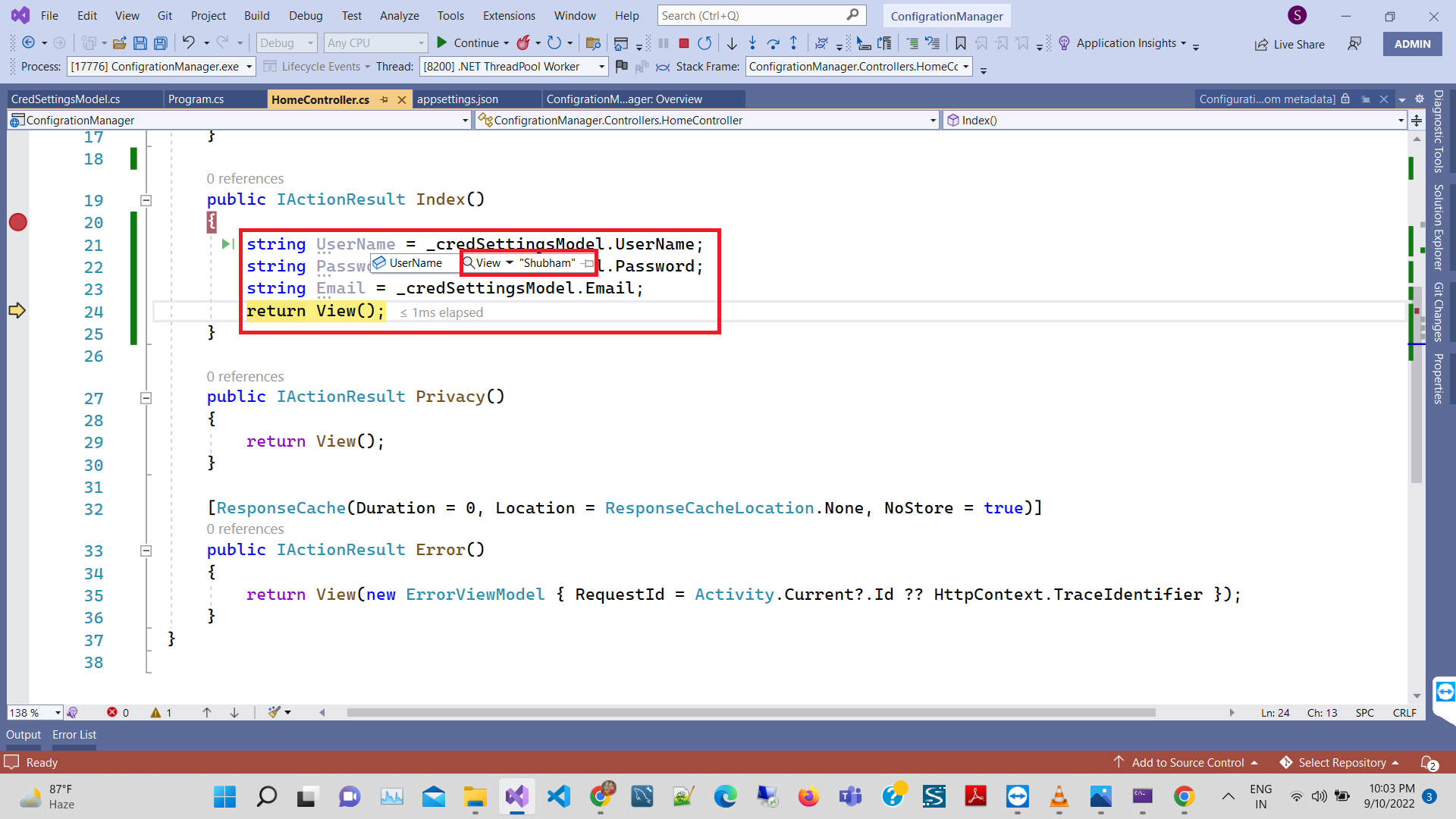
Run the project and see the output it will show the username which we mentioned in the appsetting.json file

S
Shubham Batra
Programming author at Code2Night — sharing tutorials on ASP.NET, C#, and more.
View all posts →

Related Articles

How to Create Subscriptions in Paypal in Asp.Net Core
Feb 24, 2024
Integrate Stripe Payment Gateway In ASP.NET Core 8.0
Nov 23, 2023
ASP.NET CORE CRUD Operations With Entity Framework Core In .NET CORE 8.0
Nov 21, 2023
Integrate Stripe Payment Gateway In ASP.NET Core 7.0
Jul 22, 2023

Comments

Tags

Swagger UI
Swashbuckle
SwashbuckleAspNetCore
Rest API
Postman
Api Testing
ITextSharp
Export to Pdf
AspNet Core
AspNet
C#
View to Pdf in Aspnet
Scheduler
Fibonacci series in Java
Display Fibonacci Series
First C# Program
What is C?
C
C Programming
CodeLobster
Free Download for Youtube Subscribers!

First click on Subscribe Now and then subscribe the channel and come back here.
Then Click on "Verify and Download" button for download link

Subscribe Now | 1760
Download
Support Us....!

Please Subscribe to support us

Thank you for Downloading....!

Please Subscribe to support us

Continue with Downloading
Be a Member
Join Us On Whatsapp Join Us On Facebook
Code2Night

A community platform for sharing programming knowledge, tutorials, and blogs. Learn, write, and grow with developers worldwide.

Panipat, India   info@code2night.com

Quick Links
  • Home
  • Blogs
  • Tutorials
  • About Us
  • Contact
  • Privacy Policy
  • Terms & Conditions
  • Guest Posts
Dev Tools
  • JSON Beautifier
  • HTML Beautifier
  • XML Beautifier
  • CSS Beautifier
  • JS Beautifier
  • PDF Editor
By Language
  • Angular
  • C
  • C#
  • HTML/CSS
  • Java
  • JavaScript
  • Node.js
  • Python
  • React
  • SQL Server
  • TypeScript
© 2026 Code2Night. All Rights Reserved.
Built with for developers