
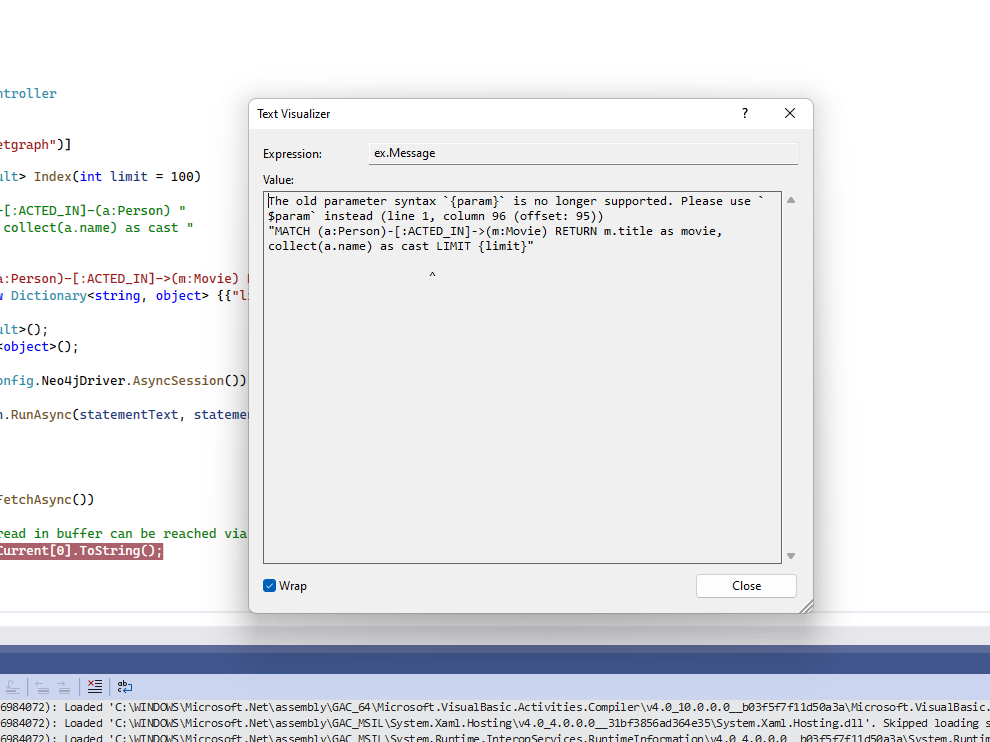
The old parameter syntax `{param}` is no longer supported
Understanding Neo4j and Its Integration with ASP.NET Core
Neo4j is a leading graph database that excels in managing and querying complex relationships between data. Its ability to represent data in graph form allows developers to execute queries that reflect real-world relationships, making it an excellent choice for applications requiring deep data insights.
When integrating Neo4j with ASP.NET Core, developers can leverage the Neo4j .NET Driver, which provides a rich set of features for interacting with the database. However, as with any technology, updates and changes can lead to deprecated features, such as the old parameter syntax.
Why You Encounter the Old Parameter Syntax Error
The error message Neo4j.Driver.ClientException: 'The old parameter syntax `{param}` is no longer supported' typically arises when executing queries that use the outdated parameter syntax. This syntax was supported in earlier versions of the Neo4j driver but has since been replaced with a more robust and flexible syntax using dollar signs ($).
For example, consider the following Cypher query:
MATCH (a:Person)-[:ACTED_IN]->(m:Movie) RETURN m.title as movie, collect(a.name) as cast LIMIT {limit}In this query, the parameter is incorrectly defined as `{limit}`. The Neo4j driver now requires the parameter to be specified with a dollar sign, like so:
MATCH (a:Person)-[:ACTED_IN]->(m:Movie) RETURN m.title as movie, collect(a.name) as cast LIMIT $limitUpdating Your Queries to Use the New Parameter Syntax
To resolve the syntax error, you need to replace all instances of the old parameter syntax in your queries. This is not just limited to the `LIMIT` clause but extends to any parameters used in your Cypher queries.
Here’s a more comprehensive example that demonstrates how to update multiple parameters in a query:
MATCH (a:Person)-[:ACTED_IN]->(m:Movie) WHERE m.releaseYear > $year RETURN m.title as movie, collect(a.name) as cast LIMIT $limitIn this updated query, both `$year` and `$limit` are correctly formatted, ensuring compatibility with the latest Neo4j driver. After making these changes, you should be able to execute your queries without encountering the old syntax error.
Edge Cases & Gotchas
While updating your queries, it's essential to be aware of some common edge cases and gotchas that can arise:
- Multiple Parameters: Ensure that all parameters are updated throughout your queries. Missing even one can lead to runtime errors.
- Query Performance: Changing the parameter syntax can impact the performance of your queries. It’s advisable to test the performance after making the updates.
- Version Compatibility: Always check the version of the Neo4j driver you are using. The syntax changes may vary between versions, and using an outdated driver could lead to confusion.
Performance & Best Practices
When working with Neo4j and ASP.NET Core, following best practices can significantly improve your application's performance and maintainability:
- Use Prepared Statements: Always utilize prepared statements when executing queries with parameters. This not only improves performance but also enhances security by preventing injection attacks.
- Batch Queries: If you are executing multiple queries, consider batching them to reduce the number of round trips to the database.
- Indexing: Ensure that your graph data is properly indexed. This can dramatically improve the performance of your queries, especially when dealing with large datasets.
- Logging and Monitoring: Implement logging and monitoring for your database interactions. This helps in identifying performance bottlenecks and debugging issues.
Conclusion
In conclusion, transitioning from the old parameter syntax to the new one in Neo4j is a straightforward process that can prevent errors and enhance your application's reliability. By adhering to best practices and being mindful of potential pitfalls, you can ensure smooth interactions with your Neo4j database.
- Ensure all parameters in your Cypher queries use the new syntax with a dollar sign ($).
- Test your queries after making updates to verify performance and correctness.
- Stay updated with the latest Neo4j driver versions to avoid deprecated syntax issues.
- Implement best practices for performance optimization and security.
