Error Too many Redirects (Cloudflare)
Understanding the 'Too Many Redirects' Error
The 'Too Many Redirects' error typically occurs when a web server is caught in a loop of redirections. This can happen for various reasons, including misconfiguration of SSL settings, incorrect URL forwarding rules, or conflicting settings between your web server and Cloudflare. When a browser encounters this error, it is unable to determine the final destination of the request, leading to an infinite loop of redirects.
This error can significantly impact user experience, as visitors may be unable to access your website. Additionally, search engines may penalize websites that consistently return this error, affecting your site's SEO ranking. Therefore, resolving this issue promptly is essential.
Prerequisites
Before diving into the solution for the 'Too Many Redirects' error, ensure you have the following:
- A Cloudflare account with your domain added
- Access to your web server's configuration settings
- Basic understanding of SSL/TLS settings and DNS management
Steps to Fix 'Too Many Redirects' Error
To resolve the 'Too Many Redirects' error when using Cloudflare, follow these detailed steps:
- Log in to your Cloudflare account: Navigate to the Cloudflare dashboard and select the domain experiencing the issue.
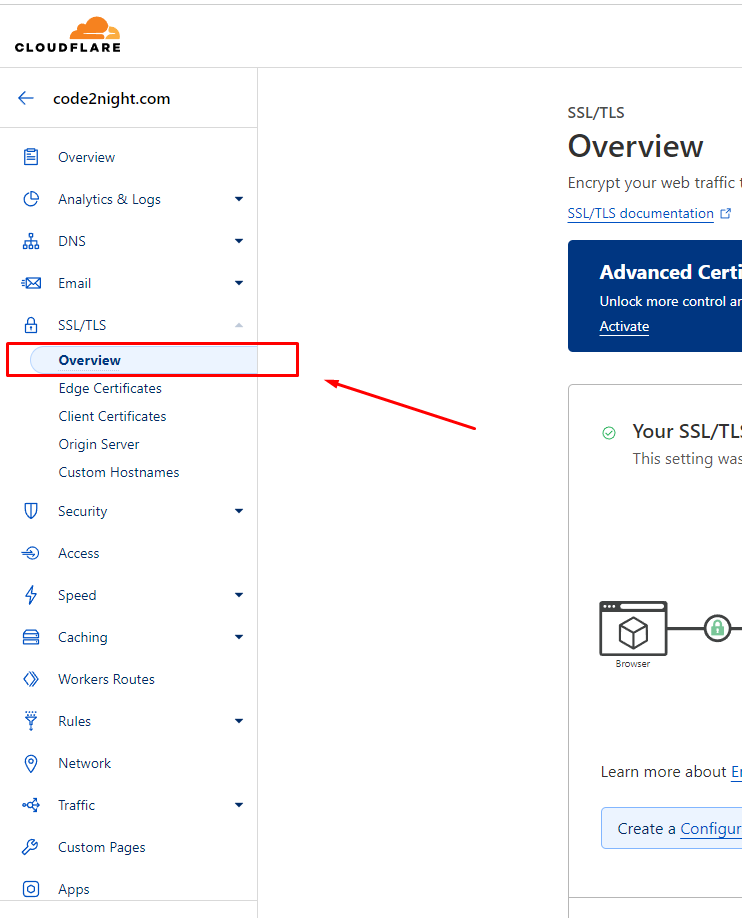
- Access the SSL/TLS settings: Click on the SSL/TLS menu on the left sidebar, then select the 'Overview' tab.
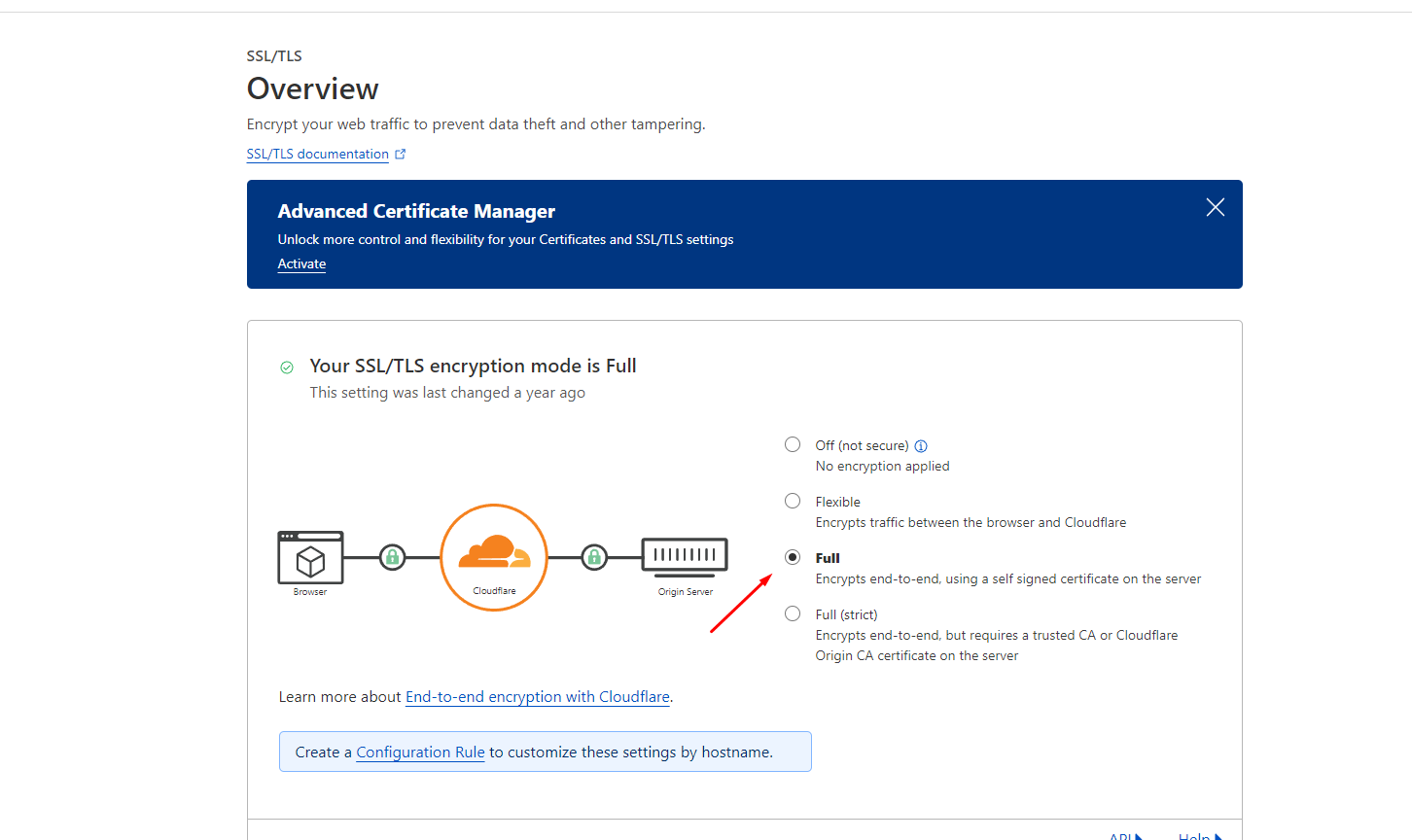
- Select the SSL mode: Change the SSL setting to 'Full'. This setting requires that your origin server has a valid SSL certificate. If your server does not have an SSL certificate, consider using 'Flexible', but be aware of its limitations.
- Wait for propagation: After changing the SSL mode, wait for approximately 5-10 minutes to allow the changes to propagate. Refresh your website during this time to see if the error persists.
After following these steps, your website should function correctly without the 'Too Many Redirects' error.
Common Causes of the Error
Understanding the underlying causes of the 'Too Many Redirects' error can help in preventing it in the future. Here are some common scenarios:
- Incorrect SSL Configuration: If your server is set to redirect HTTP traffic to HTTPS but Cloudflare is set to 'Flexible', it can lead to a conflict. This mismatch causes the server to continuously redirect between HTTP and HTTPS.
- Conflicting Redirect Rules: If you have set up URL forwarding rules in your web server's configuration (like .htaccess for Apache) that conflict with Cloudflare's settings, it can create a redirection loop.
- Multiple Redirects: Having multiple redirects in a row can also trigger this error. For example, if a request is redirected from A to B, and then from B back to A, it creates a loop.
Testing and Verifying Changes
After making adjustments to your Cloudflare settings, it is important to verify that the changes have resolved the error. Here are some methods to test your website:
- Browser Testing: Clear your browser cache or test in incognito mode to ensure you are not seeing a cached version of the error.
- Online Tools: Use online tools like HTTP Status Checker to track the redirect chain and identify where the loop may be occurring.
- Server Logs: Check your server logs for any unusual redirect patterns or error messages that could provide insights into the issue.
Edge Cases & Gotchas
While the steps outlined above should resolve the majority of 'Too Many Redirects' errors, there are some edge cases to consider:
- CDN Conflicts: If you are using multiple CDNs or caching solutions, ensure they are not conflicting with Cloudflare's settings.
- CMS Settings: Content Management Systems (like WordPress) may have their own redirect settings. Ensure that plugins or themes are not causing additional redirects.
- DNS Propagation Delays: Changes to DNS settings can take time to propagate. If you recently updated your name servers, give it some time before concluding that changes have failed.
Performance & Best Practices
To maintain optimal performance while using Cloudflare and avoid encountering the 'Too Many Redirects' error, consider the following best practices:
- Use HTTPS Everywhere: Ensure that your entire site is accessible over HTTPS and that all resources are loaded securely. This eliminates the risk of mixed content and unnecessary redirects.
- Regularly Audit Redirects: Periodically review your server's redirect rules and configurations to ensure they are not conflicting or outdated.
- Leverage Cloudflare's Page Rules: Utilize Cloudflare's Page Rules to manage redirects more effectively. This feature allows you to set specific rules for certain URLs without modifying your server configuration.
- Monitor Traffic and Errors: Use Cloudflare's analytics to monitor traffic patterns and error rates. This can help you identify issues before they affect users.
Conclusion
In summary, the 'Too Many Redirects' error can be a frustrating issue for website owners using Cloudflare. By understanding its causes and following the outlined steps, you can effectively resolve the error and maintain a smooth user experience. Here are the key takeaways:
- Understand the causes of the 'Too Many Redirects' error to prevent future occurrences.
- Properly configure SSL settings in Cloudflare to avoid conflicts.
- Regularly test and verify settings after making changes.
- Implement best practices to maintain optimal website performance.