
Complete Guide to TreeSet in Java with Examples and Explanations
TreeSet in Java
TreeSet is a part of the Java Collections Framework and is an implementation of the SortedSet interface. It provides a set that is sorted in a natural order or according to a specified comparator. Unlike HashSet, TreeSet does not allow duplicate elements, and it provides efficient performance for basic operations, such as adding, removing, and searching for elements. This makes TreeSet particularly useful when maintaining a collection of items that need to be sorted.
TreeSet is not just a data structure; it has real-world applications in scenarios where data needs to be stored in a sorted order, such as maintaining a leaderboard in gaming applications, managing a list of unique usernames, or even storing sorted data for efficient searching.
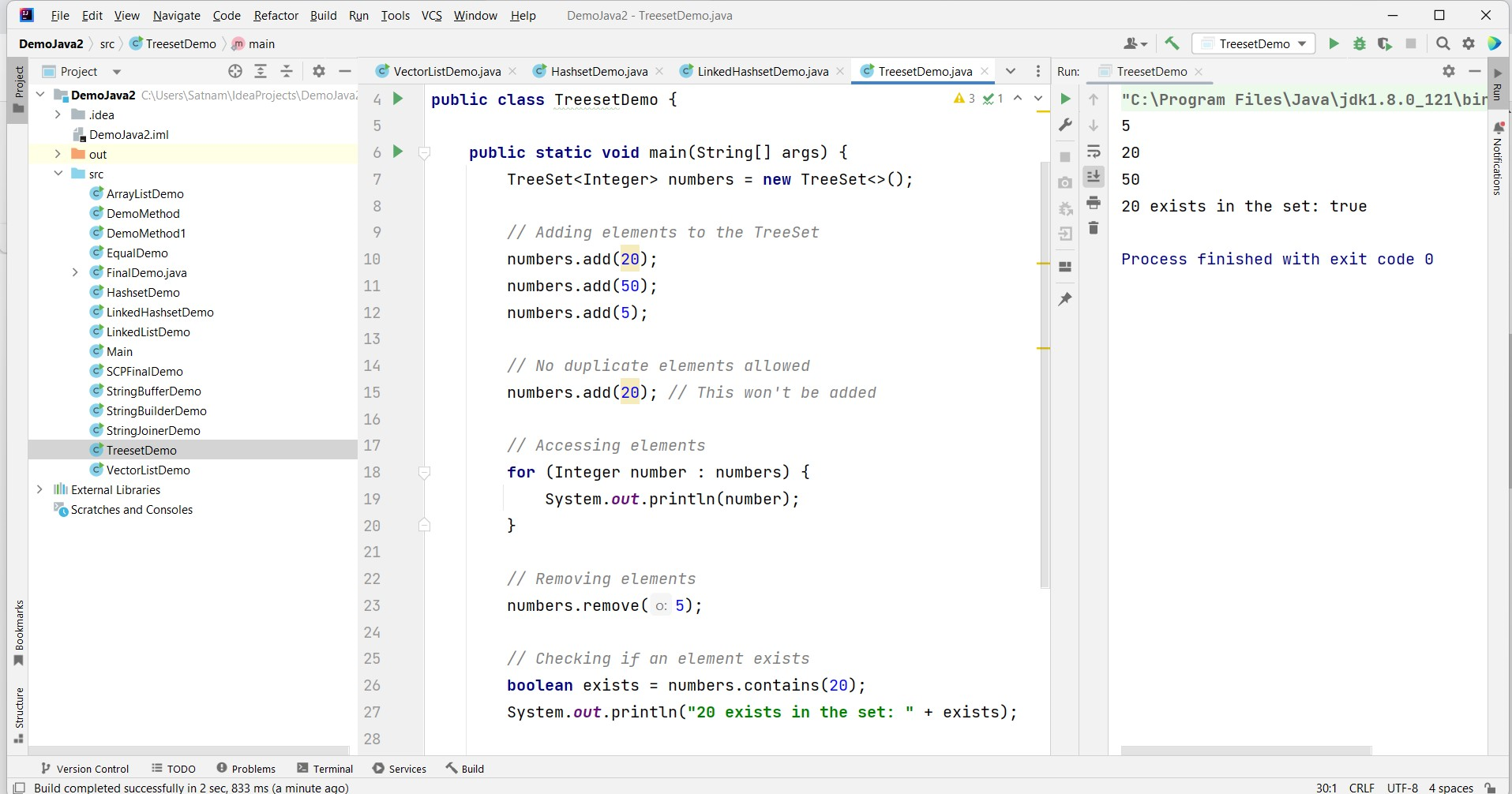
Declaration and Initialization
To use a TreeSet in Java, you need to import the java.util.TreeSet package. Here's an example of declaring and initializing a TreeSet:
import java.util.TreeSet;

public class Example {
    public static void main(String[] args) {
        TreeSet<Integer> numbers = new TreeSet<>();
        // Adding elements to the TreeSet
        numbers.add(20);
        numbers.add(50);
        numbers.add(5);
        // No duplicate elements allowed
        numbers.add(20); // This won't be added
        // Accessing elements
        for (Integer number : numbers) {
            System.out.println(number);
        }
        // Removing elements
        numbers.remove(5);
        // Checking if an element exists
        boolean exists = numbers.contains(20);
        System.out.println("20 exists in the set: " + exists);
    }
}
Common TreeSet Operations
Here are some commonly used operations with TreeSets:
- add(element): Adds an element to the TreeSet.
- remove(element): Removes an element from the TreeSet.
- contains(element): Checks if the TreeSet contains a specific element.
- size(): Returns the number of elements in the TreeSet.
- isEmpty(): Checks if the TreeSet is empty.
- clear(): Removes all elements from the TreeSet.
TreeSet is a versatile data structure when the requirement is to maintain a unique set of elements in a sorted order. It is an excellent choice for tasks that involve searching, range queries, or maintaining a sorted collection of elements.
Comparing TreeSet with Other Set Implementations
When considering different Set implementations in Java, it is essential to understand how TreeSet compares to HashSet and LinkedHashSet. While HashSet offers constant time performance for basic operations, it does not maintain any order of elements. In contrast, TreeSet maintains a natural ordering or a custom order defined by a comparator, which can lead to slower performance due to the tree structure.
LinkedHashSet, on the other hand, maintains insertion order and provides faster iteration compared to TreeSet. However, it does not sort the elements. Therefore, the choice between these implementations should be based on the specific needs of your application.
import java.util.HashSet;
import java.util.LinkedHashSet;
import java.util.TreeSet;

public class SetComparison {
    public static void main(String[] args) {
        HashSet<String> hashSet = new HashSet<>();
        TreeSet<String> treeSet = new TreeSet<>();
        LinkedHashSet<String> linkedHashSet = new LinkedHashSet<>();

        hashSet.add("Banana");
        hashSet.add("Apple");
        hashSet.add("Mango");

        treeSet.add("Banana");
        treeSet.add("Apple");
        treeSet.add("Mango");

        linkedHashSet.add("Banana");
        linkedHashSet.add("Apple");
        linkedHashSet.add("Mango");

        System.out.println("HashSet: " + hashSet);
        System.out.println("TreeSet: " + treeSet);
        System.out.println("LinkedHashSet: " + linkedHashSet);
    }
}
Custom Comparators in TreeSet
TreeSet allows for the use of custom comparators to define the order of elements. This is particularly useful when dealing with objects or when a specific order is required. By implementing the Comparator interface, you can control how the elements are sorted within the TreeSet.
Here’s an example of using a custom comparator with TreeSet:
import java.util.Comparator;
import java.util.TreeSet;

class Person {
    String name;
    int age;

    Person(String name, int age) {
        this.name = name;
        this.age = age;
    }
}

class AgeComparator implements Comparator<Person> {
    @Override
    public int compare(Person p1, Person p2) {
        return Integer.compare(p1.age, p2.age);
    }
}

public class CustomComparatorExample {
    public static void main(String[] args) {
        TreeSet<Person> people = new TreeSet<>(new AgeComparator());
        people.add(new Person("Alice", 30));
        people.add(new Person("Bob", 25));
        people.add(new Person("Charlie", 35));

        for (Person person : people) {
            System.out.println(person.name + " - " + person.age);
        }
    }
}
Edge Cases & Gotchas
While working with TreeSet, there are some edge cases and gotchas to be aware of:
- Null Elements: TreeSet does not allow null elements if it uses natural ordering. Attempting to add a null will throw a NullPointerException.
- Custom Comparators: If you are using a custom comparator, ensure that it is consistent with equals(). Failing to do so can lead to unpredictable behavior.
- Concurrent Modification: TreeSet is not synchronized. If multiple threads are accessing a TreeSet concurrently, it is advisable to use Collections.synchronizedSortedSet() to avoid concurrency issues.
Performance & Best Practices
TreeSet offers O(log n) time complexity for basic operations like add, remove, and contains due to its underlying Red-Black tree structure. However, the performance can be affected by the nature of the comparator used and the size of the data set.
Here are some best practices to consider when using TreeSet:
- Choose the Right Comparator: If you need a specific ordering, ensure that your comparator is efficient and consistent.
- Avoid Nulls: As mentioned earlier, avoid adding null elements to prevent exceptions.
- Consider Thread Safety: If your application is multi-threaded, consider using synchronized collections or other thread-safe alternatives.
- Use for Range Queries: TreeSet is excellent for range queries due to its sorted nature. Utilize methods like subSet(), headSet(), and tailSet() for efficient range operations.
Conclusion
In summary, TreeSet is a robust data structure within the Java Collections Framework that provides a sorted collection of unique elements. It is ideal for scenarios where order matters and is preferable over HashSet or LinkedHashSet when sorting is required. Key takeaways include:
- TreeSet implements the SortedSet interface and maintains sorted order.
- It does not allow duplicate elements and offers efficient performance for add, remove, and contains operations.
- Custom comparators can be used to define specific sorting behavior.
- Be cautious of null elements and ensure thread safety in concurrent applications.
