Login Register
Code2night
  • Home
  • Blog Archive
  • Learn
    • Tutorials
    • Videos
  • Interview Q&A
  • Languages
    • Angular Angular js ASP.NET Asp.net Core ASP.NET Core, C# C C# C#, ASP.NET Core, Dapper
      C#, ASP.NET Core, Dapper, Entity Framework DotNet HTML/CSS Java JavaScript Node.js Python Python 3.11, Pandas, SQL
      Python 3.11, SQL Python 3.11, SQLAlchemy Python 3.11, SQLAlchemy, SQL Python 3.11, SQLite React Security SQL Server TypeScript
  • Post Blog
  • Tools
    • Beautifiers
      JSON Beautifier HTML Beautifier XML Beautifier CSS Beautifier JS Beautifier SQL Formatter
      Dev Utilities
      JWT Decoder Regex Tester Diff Checker Cron Explainer String Escape Hash Generator Password Generator
      Converters
      Base64 Encode/Decode URL Encoder/Decoder JSON to CSV CSV to JSON JSON to TypeScript Markdown to HTML Number Base Converter Timestamp Converter Case Converter
      Generators
      UUID / GUID Generator Lorem Ipsum QR Code Generator Meta Tag Generator
      Image Tools
      Image Converter Image Resizer Image Compressor Image to Base64 PNG to ICO Background Remover Color Picker
      Text & Content
      Word Counter PDF Editor
      SEO & Web
      SEO Analyzer URL Checker World Clock
  1. Home
  2. Blog
  3. HTML/CSS
  4. Free PHP, HTML, CSS, JavaScript/TypeScript editor - CodeLobster IDE

Free PHP, HTML, CSS, JavaScript/TypeScript editor - CodeLobster IDE

Date- Apr 05,2023 Updated Feb 2026 4930
CodeLobster php editor

Hello guys and welcome to Code2Night. In this article, we suggest you get acquainted with the free editor of web languages - CodeLobster IDE. It is presented on the software market for a long time already, and it wins a lot of fans.

Free PHP, HTML, CSS, JavaScript/TypeScript editor - CodeLobster IDE

In this article, we suggest you to get acquainted with the free editor of web languages - CodeLobster IDE. It is presented on the software market for a long time already, and it wins a lot of fans.

CodeLobster IDE allows you to edit PHP, HTML, CSS, JavaScript and TypeScript files, it highlights the syntax and gives hints for tags, functions and their parameters. This editor easily deals with those files that contain a mixed content.

If you insert PHP code in your HTML template, then the editor correctly highlights both HTML tags and PHP functions. The same applies to CSS and JavaScript/TypeScript code, which is contained in HTML files.

The program includes auto-completion function, which greatly speeds up the programmer's work and eliminates the possibility of errors.
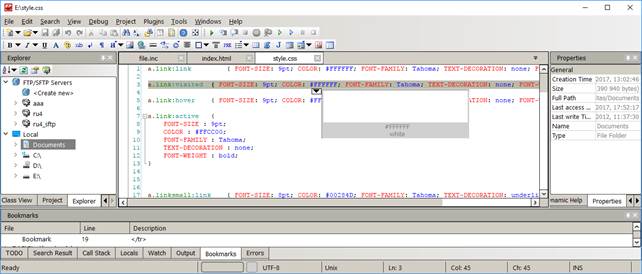
 

Codelobster


CodeLobster IDE provides contextual help on all supported programming languages, it uses the most up to date documentation at this moment, downloading it from official sites. So we can quickly get a description of any HTML tag, CSS attribute, PHP or JavaScript/TypeScript function by pressing the F1 key.

The built-in PHP debugger allows you to execute PHP scripts step by step, sequentially moving through the lines of code. You can assign check points, view the process of the work of loops, and monitor the values of all variables during the execution of the script.


Other useful functions and features of the IDE:


  • A pair highlighting of parentheses and tags - you will never have to count parentheses or quotation marks, the editor will take care of it. 
  • Highlighting of blocks, selection and collapsing of code snippets, bookmarks to facilitate navigation on the edited file, recognition and building of the complete structure of PHP projects - these functions ensure easy work with projects of any scale. 
  • Support for 17 user interface languages, among them English, German, Russian, Spanish, French and others. 
  • The program works on the following operation systems: Windows 7, Windows 8, Windows 10, Mac OS, Linux, Ubuntu, Fedora, Debian. 


The professional version of CodeLobster IDE provides the programmer with even more features. 

For example, you have an opportunity to work with projects on a remote server with use of the built-in FTP client. You can edit the selected files, preview the results and then synchronize the changes with the files on the hosting.


In addition the professional version includes an extensive set of plug-ins:


  • Fully implemented support for JavaScript (and TypeScript) libraries, such as jQuery, Node.js, AngularJS, AngularTS, BackboneJS, EmberJS, VueJS and MeteorJS.


  • A large set of extensions that help to work with PHP frameworks - CakePHP, CodeIgniter, Laravel, Phalcon, Smarty, Symfony, Twig and Yii plug-ins.


  • Plugins for working with the most popular CMS - Drupal, Joomla, Magento and WordPress.


  • Also CodeLobster IDE has special plug-in for Bootstrap.


We can download and install any framework directly from the program without being distracted from the main tasks.


In general, for a year of work, our team had no complaints against the editor. CodeLobster IDE works fast, does not hang and allows us to work even with large PHP projects.


You can download CodeLobster IDE from the original website http://www.codelobster.com/.

S
Shubham Saini
Programming author at Code2Night โ€” sharing tutorials on ASP.NET, C#, and more.
View all posts โ†’

Related Articles

Understanding Data Binding in Angular: Mastering One-way and Two-way Binding
Mar 25, 2026
Realtime Speech to Text converter using javascript
Dec 16, 2023
Mastering External CSS in HTML: A Complete Guide with Examples
Dec 09, 2023
Complete Guide to CSS Assignment 1: Step-by-Step Explained
Dec 09, 2023
Previous in HTML/CSS
How to create a table with fixed header and scrollable body
Next in HTML/CSS
Child internet safety
Buy me a pizza

Comments

On this page

๐ŸŽฏ

Interview Prep

Ace your HTML/CSS interview with curated Q&As for all levels.

View HTML/CSS Interview Q&As

More in HTML/CSS

  • Responsive Slick Slider 23058 views
  • How to add a WhatsApp share button on a website 19335 views
  • Slick Slider with single slide 18052 views
  • Code syntax higlighter using Prism js 13658 views
  • Create a Music Player in HTML/CSS: Step-by-Step Guide 9368 views
View all HTML/CSS posts โ†’

Tags

AspNet C# programming AspNet MVC c programming AspNet Core C software development tutorial MVC memory management Paypal coding coding best practices data structures programming tutorial tutorials object oriented programming Slick Slider StripeNet
Free Download for Youtube Subscribers!

First click on Subscribe Now and then subscribe the channel and come back here.
Then Click on "Verify and Download" button for download link

Subscribe Now | 1770
Download
Support Us....!

Please Subscribe to support us

Thank you for Downloading....!

Please Subscribe to support us

Continue with Downloading
Be a Member
Join Us On Whatsapp
Code2Night

A community platform for sharing programming knowledge, tutorials, and blogs. Learn, write, and grow with developers worldwide.

Panipat, Haryana, India
info@code2night.com
Quick Links
  • Home
  • Blog Archive
  • Tutorials
  • About Us
  • Contact
  • Privacy Policy
  • Terms & Conditions
  • Guest Posts
  • SEO Analyzer
Dev Tools
  • JSON Beautifier
  • HTML Beautifier
  • CSS Beautifier
  • JS Beautifier
  • SQL Formatter
  • Diff Checker
  • Regex Tester
  • Markdown to HTML
  • Word Counter
More Tools
  • Password Generator
  • QR Code Generator
  • Hash Generator
  • Base64 Encoder
  • JWT Decoder
  • UUID Generator
  • Image Converter
  • PNG to ICO
  • SEO Analyzer
By Language
  • Angular
  • Angular js
  • ASP.NET
  • Asp.net Core
  • ASP.NET Core, C#
  • C
  • C#
  • C#, ASP.NET Core, Dapper
  • C#, ASP.NET Core, Dapper, Entity Framework
  • DotNet
  • HTML/CSS
  • Java
  • JavaScript
  • Node.js
  • Python
  • Python 3.11, Pandas, SQL
  • Python 3.11, SQL
  • Python 3.11, SQLAlchemy
  • Python 3.11, SQLAlchemy, SQL
  • Python 3.11, SQLite
  • React
  • Security
  • SQL Server
  • TypeScript
© 2026 Code2Night. All Rights Reserved.
Made with for developers  |  Privacy  ยท  Terms
Translate Page
We use cookies to improve your experience and analyze site traffic. By clicking Accept, you consent to our use of cookies. Privacy Policy
Accessibility
Text size
High contrast
Grayscale
Dyslexia font
Highlight links
Pause animations
Large cursor